
UPDATED FOR THE APRIL 2026 FSSAI RULES
FSSAI licence for restaurants: type, documents, application and mistakes
Every restaurant, takeaway counter and delivery-only kitchen is a food business. The practical question is not simply “Do I need FSSAI?” but “Which approval applies to this premises, which business activities must be endorsed and which evidence will FoSCoS ask me to upload?” This guide answers those questions in plain language.
Choose a section in this guide
DO NOT FOLLOW AN OLD ₹12-LAKH ARTICLE
The turnover limits changed on 1 April 2026
FSSAI raised the general registration threshold from ₹12 lakh to ₹1.5 crore and the State Licence ceiling to ₹50 crore for new applications from 1 April 2026. It also introduced perpetual validity: an approval remains valid unless it is suspended, cancelled or surrendered. That removes the repeated renewal application, but it does not remove applicable fees, hygiene duties, inspections, modifications or the need to keep the business details correct.
Registration, State Licence or Central Licence?
For an ordinary restaurant application, start with annual turnover for that food business and then verify the result against the current FoSCoS eligibility tool. The official restaurant eligibility matrix updated for 1 April 2026 lists:
| Restaurant turnover | Starting category | Published annual fee | Plain-language meaning |
|---|---|---|---|
| Up to ₹1.5 crore | FSSAI Registration | ₹100 | The simplified route now covers many small restaurants and cloud kitchens. |
| Above ₹1.5 crore and up to ₹50 crore | State Licence | ₹5,000 | The application is handled by the State licensing authority for that premises. |
| Above ₹50 crore | Central Licence | ₹7,500 | The application falls under the Central licensing category. |
Scope matters: these are the current restaurant turnover bands, not a shortcut for every food business. Airports, seaports, railway premises, Central Government premises, import/export, hotels, e-commerce operations and some other activities have their own criteria. A business operating in two or more States/UTs must declare a head or registered office and obtain the applicable Central Licence for it, while each operating premises needs its own approval based on eligibility.
Add all real activities to one approval
FoSCoS states that a premises should have one registration or licence on which any number of applicable kinds of business can be endorsed. Do not create duplicate approvals for the same premises merely because it has dine-in and delivery.
Do not reuse one number everywhere
Each branch, kitchen or operating location normally needs its own approval. If the company operates in more than one State/UT, check the separate head-office requirement.
FSSAI documents required for a restaurant
FoSCoS builds the final mandatory-document list from the category, kind of business, constitution, activity, premises and State. Prepare clear, self-attested files, but treat the list displayed inside your actual application as final.
For FSSAI Registration
The official registration document sheet lists three basic items:
- Applicant photograph.
- Government-issued photo identity proof such as Aadhaar, PAN or Voter ID.
- Proof of the food-business address when it differs from the address on the identity document.
Common preparation set for a State or Central Licence
| Document or information | Why it is used | Common restaurant mistake |
|---|---|---|
| Completed Form B and authorised signature | Records the licence application and responsible applicant | Using a different name or signatory across the form and supporting files |
| Government photo ID and address proof | Identifies the proprietor, partner, director or authorised signatory | Uploading an unreadable crop or an expired/irrelevant document |
| Proof of possession of the premises | Connects the applicant with the restaurant location | Address or unit number does not match the application |
| Business-constitution evidence | Shows proprietorship, partnership, company, society or trust details | Brand name is entered where the legal entity name is required |
| List of proprietor/partners/directors and contact details | Identifies the people responsible for the entity | Directors or partners differ from the current records |
| Food Safety Management System plan or declaration | Shows how the operator will meet food-safety controls | Downloading a template but not adapting the controls to the kitchen |
| Turnover evidence, when requested | Supports the selected category | Choosing a lower category without support for the declared turnover |
| Form IX and board authorisation, where applicable | Nominates a responsible person for a company | Assuming a company and a proprietorship use the same authorisation |
| State- or activity-specific documents | Covers local NOCs or special food activities where applicable | Copying another State’s checklist or uploading manufacturing documents unnecessarily |
Blueprints, machinery lists, water-analysis reports and product-category lists appear in the general licence document list mainly for manufacturing/processing situations. Do not guess whether your operation triggers them: answer the FoSCoS activity questions accurately and follow the generated mandatory list.
How to apply for an FSSAI licence online through FoSCoS
- 1
Use only the official FoSCoS portal
Open Apply for New Licence/Registration. FSSAI says official payments should be made only through FoSCoS. Do not pay a person who sends a look-alike link.
- 2
Select the premises location
Choose the State/UT and the correct premises route. Railway, airport/seaport and general premises are not interchangeable.
- 3
Choose the real kind of business
Select Restaurant if that definition matches the operation, and add any other activity actually carried out at that premises. A caterer, hotel, retailer, manufacturer or e-commerce operator should not select Restaurant merely because it sounds simpler.
- 4
Confirm eligibility before starting the form
Use the official eligibility checker. Record the category shown and keep the supporting turnover or activity evidence.
- 5
Enter the name and premises address exactly
FoSCoS warns that the information will be printed on the approval. Match the legal entity, authorised person, unit number, spelling and pincode to the relevant evidence.
- 6
Upload readable, self-attested documents
Use the formats and size limits shown by FoSCoS. Merge pages only where the portal instructs you to do so. Preview every file before submission.
- 7
Pay inside FoSCoS and save the reference
Download the acknowledgement or receipt and save the application reference number. Track the application through the official portal.
- 8
Answer queries and prepare for inspection
Monitor the registered email, phone and FoSCoS account. Reply with the requested evidence by the stated deadline and make sure the kitchen follows the applicable Schedule 4 hygiene requirements.
Interactive application readiness check
Common FSSAI application mistakes—and how to avoid them
| Mistake | Why it causes trouble | Better action |
|---|---|---|
| Using the old ₹12-lakh threshold | It can send a 2026 new applicant into the wrong route. | Use the current ₹1.5-crore and ₹50-crore bands, then verify in FoSCoS. |
| Choosing “Restaurant” for every food activity | Wrong kind-of-business selection can omit required endorsements or documents. | Describe what actually happens at the premises. |
| Mixing the brand name and legal entity | The certificate, identity, bank and platform records become difficult to reconcile. | Use each name only in the field intended for it. |
| Incomplete or mismatched address | The approval may print the wrong unit or the evidence may not support the application. | Match floor, shop/unit number, locality and pincode. |
| One approval reused for several kitchens | FSSAI approval is premises-based. | Check each operating location separately. |
| Duplicate approvals for one premises | One premises can carry multiple kinds of business on one approval. | Use endorsement/modification where appropriate instead of duplicating. |
| Unclear or non-self-attested uploads | The authority may raise a query and processing can stop. | Scan complete pages, self-attest as required and preview files. |
| Ignoring a FoSCoS query | Official FAQs say failure to provide required information within the stipulated period can lead to rejection. | Monitor the registered contact details and reply through the portal. |
| Paying an unofficial “guaranteed approval” agent | It creates fraud, privacy and duplicate-payment risk. | Use FoSCoS and verify official communication before acting. |
| Treating the certificate as the end of compliance | Perpetual validity does not cancel hygiene, fee, inspection, display or modification duties. | Maintain Schedule 4 controls and keep details current. |
FSSAI do’s and don’ts for a restaurant
Do
- Use the official FoSCoS eligibility result for the exact premises.
- Keep raw application documents and the issued certificate in a controlled compliance folder.
- Buy and sell food products through appropriately registered or licensed vendors and maintain supporting records.
- Display the registration/licence number and the correct Food Safety Display Board prominently.
- Print the 14-digit number on applicable receipts, invoices, cash memos and bills.
- Apply for modification when material approved details change.
- Train food handlers and maintain actual hygiene controls, not only paperwork.
Don’t
- Do not copy thresholds or forms from an undated blog.
- Do not understate turnover or hide a real business activity to obtain a simpler category.
- Do not upload another outlet’s address proof, FSMS plan or certificate.
- Do not share FoSCoS password, OTP, bank credentials or identity documents with an unverified caller.
- Do not assume a Zomato or Swiggy listing replaces the restaurant’s FSSAI obligation.
- Do not claim that FSSAI approval guarantees platform onboarding or business success.
- Do not wait for an inspection to begin following food-safety practices.
Using the certificate for Zomato or Swiggy onboarding
A restaurant may be asked for its FSSAI registration or licence details during partner onboarding or account review. Use a clear copy of the current certificate and make the restaurant name, legal entity and premises address consistent with the genuine supporting records. If a platform rejects or cannot verify a document, use the authenticated partner support channel and ask which field is inconsistent; do not edit the certificate image to make it appear to match.
An FSSAI approval demonstrates a regulatory status for the named food business and premises. It does not mean FSSAI endorses the restaurant, does not guarantee listing approval, and does not prove that every future hygiene practice is compliant.
What to do after the FSSAI number is issued
- Verify it publicly. Use FSSAI’s licence verification route and check the name, premises and status.
- Display it correctly. FSSAI says the number must be visible at the food premises. Its Food Safety Display Board guidance specifies A4 for registered businesses and A3 for licensed businesses.
- Put the number on transaction documents. The 14-digit number is mandatory on applicable cash receipts, invoices, cash memos and bills, subject to the official exceptions.
- Operate the system described in the application. Follow the relevant Schedule 4 hygiene and sanitary requirements and keep the FSMS plan alive in daily work.
- Keep the approval current. Perpetual validity means no repeated renewal application, but the approval can still be suspended, cancelled or surrendered. Continue paying applicable fees and update changed details through FoSCoS.
Official help and verification routes
Apply or track
Use FoSCoS for new applications, current notices, tracking, payments and account queries.
Open official FoSCoSCheck eligibility
Confirm the correct kind of business, approval category and fee for the exact premises.
Use the eligibility checkerCheck documents
Review the current general and State-specific document lists before uploading.
Open official document listsTechnical assistance
FoSCoS publishes the helpline 1800-11-2100 and helpdesk-foscos@fssai.gov.in. Confirm these on the portal before sharing application information.
Read official FAQsSources and further checks
- FSSAI order dated 13 March 2026 — revised ₹1.5-crore/₹50-crore thresholds effective 1 April 2026.
- FSSAI reform press release dated 13 March 2026 — instant Registration and elimination of pre-inspection under the revised framework.
- FSSAI’s 2026 amendment FAQs — perpetual validity, fee payment and migration.
- FoSCoS eligibility matrix updated 1 April 2026 — restaurant categories and published fees.
- Official documents for Registration Certificate.
- State Licence documents and Central Licence documents.
- FSSAI Schedule 4 hygiene requirements.
- FSSAI Food Safety Display Boards.
Checked against official FSSAI and FoSCoS material on 10 September 2026. If an official application screen or later order conflicts with this summary, follow the current official requirement and seek qualified advice for the premises.
Frequently asked questions about FSSAI for restaurants
Does a delivery-only cloud kitchen need FSSAI registration or a licence?
Yes. It prepares and sells food even without a dining room. Use the current FoSCoS eligibility checker to decide between Registration, State Licence and Central Licence for that premises and its activities.
Is FSSAI Registration the same as an FSSAI Licence?
No. Registration is the simplified approval category for eligible smaller food businesses; State and Central Licences apply to the higher or specially classified categories. All are issued under the food-safety framework and produce an identifying number.
Can one number cover two restaurant branches?
Normally no. Each operating premises needs its own applicable approval. A company operating in two or more States/UTs also needs to check the separate head- or registered-office Central Licence requirement.
Do approvals issued from April 2026 need renewal?
FSSAI’s 2026 amendment provides perpetual validity unless the approval is suspended, cancelled or surrendered. The business still has to pay applicable fees, meet continuing compliance requirements and modify changed details.
How long can the process take?
FSSAI’s March 2026 reform announcement describes instant Registration and elimination of pre-inspection under the revised framework. Licence applications can still involve scrutiny or inspection, and practical timing can vary. Follow the status and deadline shown in FoSCoS, respond promptly to queries and do not rely on a guaranteed completion date.
Can Food Data Extractor submit the FSSAI application?
No. Our Chrome extension helps authorised restaurant partners export selected records from supported Zomato or Swiggy partner pages. It does not submit government applications, upload identity documents to FoSCoS or guarantee approval.
PRACTISE WITH EVIDENCE
An example application file: organise evidence before submitting
Distinguish a legal entity from its restaurant brand
Imagine a fictional business called Example Hospitality LLP trading as Example Kitchen at a single leased premises. The operator prepares a simple reconciliation page showing the legal name, trading name, complete premises address, authorised signatory and the supporting document for each. This page is an internal preparation aid, not a substitute for a FoSCoS form or a mandatory document issued by an authority.
When a field asks for the applicant’s legal identity, do not automatically paste the customer-facing brand. When a premises field asks for the address, include the correct floor or unit rather than only the street name. Preview how the information appears against the lease or other relevant evidence. If records genuinely disagree, correct the underlying record through its proper channel; never alter a certificate image to manufacture consistency.
Make a document tracker, not an unsafe public upload
- Use the official eligibility route for the real premises, turnover and activities. Record the date checked and any special criteria that apply.
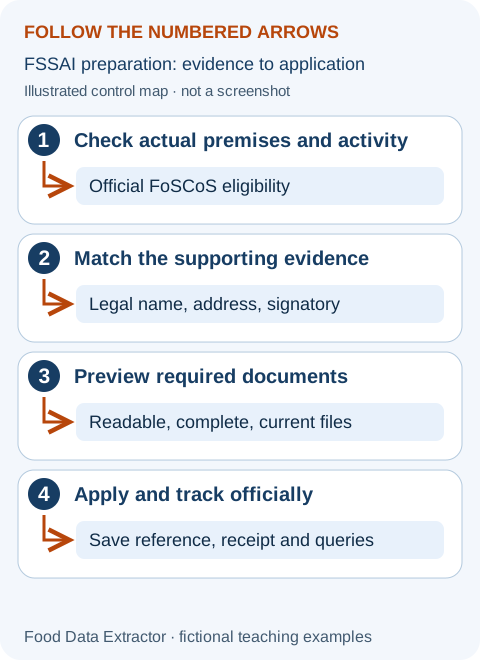
- Copy the mandatory list generated for the actual application into a private tracker. Add an owner, file version and checked/not-checked status for each item.
- Preview complete readable pages before uploading through official FoSCoS. Follow its current format, size and self-attestation requirements rather than a limit from an old video.
- Save the official acknowledgement and payment receipt. Record every query, response deadline and evidence supplied without exposing identity documents in a public group.
What our tools cannot do for a licence
The checklist on this page only helps you organise preparation. It does not submit an application, verify a certificate, calculate legal eligibility or contact FSSAI. The free financial tools can help budget operating costs after you enter them, but cannot determine licensing obligations or food safety. Use official FoSCoS for the application and status, and qualified assistance when the premises or activities are unclear.
After approval, give continuing compliance an owner just as you give sales an owner. Maintain current premises details, applicable payments, hygiene controls and required display information. FSSAI’s March 2026 amendment FAQs explain the revised framework; perpetual validity does not turn safe operation into a one-time paperwork task. Check the current portal before acting on a deadline or migration instruction.
The complete beginner tool manual explains controls, units, privacy and access limits. Examples are invented and are not platform rates or restaurant results.
Application problem workshop: prepare, check and respond without panic
A first-time owner often worries less about the legal vocabulary than about a practical question: “What do I do next, and how do I avoid sending the wrong thing?” The checklist above identifies the main stages. This workshop explains how to work through them when your documents are spread across messages, an agent has given conflicting advice, or the application asks for a correction. It is a preparation method, not an eligibility decision or promise of approval.
Keep the exact application on official FoSCoS as the point of reference. “Kind of business” means the activity you actually carry out. “Premises” means the place where that activity happens. “Constitution” means the legal form of the business, such as a proprietorship, partnership or company. “Authorised signatory” means the person permitted to sign for it. Understanding these words helps you answer the form honestly instead of choosing whichever option sounds easiest.
Describe the operation before selecting a category
Write an ordinary-language description of what you will do: cook meals for customers, prepare food for events, manufacture packaged products, store goods, sell purchased products, or another actual activity. List where it happens and whether more than one location is involved. This private note is not a government form. It helps you explain the operation when using the current eligibility tool or asking the authority a specific question.
A fictional operator, Fresh Table, cooks lunches in one kitchen and serves those meals both in a dining room and through delivery. Another fictional operator makes packaged sauces for sale to shops. They both handle food, but should not assume the same business selection or document list applies. The application should reflect the real activities, not the label a neighbour used or a video creator recommended for a different operation.
If you are unsure, pause before submitting and ask with a precise description. “We cook these types of meals at this premises and also plan this separate activity; which route should we check?” is clearer than “Which licence is cheapest?” Keep the response and date with your preparation notes. Do not hide an activity because you worry it might require more work; an incomplete selection can leave the application disconnected from the business.
Separate the brand, business and applicant names
The name customers see may differ from the name of the legal business. A brand can be a trading name, while the legal entity is the person or organisation operating it. The applicant or signatory may be another specifically authorised person. Do not copy one name into every field without reading what each field asks. The existing document should support the answer rather than being edited to match a guess.
For a fictional company, Example Meals Private Limited operates the brand Green Spoon. Its internal name map has separate rows for the legal name, brand and authorised person, with a source beside each. If a field requests the legal entity, the brand alone is not a replacement. If the application has a field for the trading name, follow its instructions rather than assuming that a marketing name belongs everywhere.
Check spelling, punctuation and current business records before uploading. If the records themselves disagree, identify which document needs an official correction or clarification. Do not alter an identity file in an image editor to make it fit the application. A private explanation note can highlight the issue, but it cannot replace a valid supporting document or the authority's decision about acceptable evidence.
Make the address readable and consistent
Read the complete operating address across the application and the supporting evidence. Check the unit or shop number, floor where relevant, building, locality and postal code. A missing unit number can confuse two kitchens in the same building. The brand's mailing address is not automatically the food-business address. If the location is unusual or shared, use the current official instructions and obtain clarification rather than selecting a more familiar address.
Imagine an operator whose lease refers to Unit B while a utility bill names the whole building. The preparation task is to establish which evidence the actual application requires and how the unit is supported. It is not to invent a new lease format or upload unrelated proof. Write the discrepancy down and ask the appropriate verified source. A careful explanation before submission may be easier than trying to correct a printed approval later.
For multiple kitchens, keep a separate address file for each location so documents do not get swapped. Name private files by premises reference and document type without exposing unnecessary personal details. Do not reuse an approval number from another outlet simply because the same brand owns both. The earlier eligibility section explains why the actual premises and any multi-State arrangements need their own checks.
Build a document tracker that prevents last-minute confusion
Copy the current required list for your actual application into a private tracker. Put the item, source, responsible person, file version and checked status in separate columns. Add whether the item is requested, not requested or awaiting clarification. This prevents a general internet checklist from turning every possible document into a supposed mandatory requirement. The official application and current authority guidance decide what is required for your situation.
Use “ready” only when the file has been opened and checked. A photograph saved on a phone is not ready merely because someone says they sent it. Confirm that all needed pages are present and readable, that the document belongs to the correct person or premises, and that any stated attestation requirement has been followed. Follow the portal's current size and format instructions rather than a remembered limit from an old tutorial.
Assign one final reviewer. Several people can collect documents, but one person should compare the completed pack with the form before submission. Keep a copy of what was submitted, subject to appropriate privacy and retention arrangements. If a query later refers to a specific file, this copy lets you inspect the exact version instead of arguing about which of several message attachments was uploaded.
Check a scan as if you had never seen the original
Open each file at a readable size. Can you see the whole page, every relevant corner and the required information? Is the image blurred, dark or cut off? Do pages appear in the correct order? A file that looks fine as a tiny phone thumbnail may be unreadable when reviewed. Scan genuine documents clearly; do not improve their apparent content by removing inconvenient information or changing an original field.
If a document has several pages, follow the upload instruction for that document. Do not assume every item should be merged into one large file, or that every page must be uploaded separately. Check the actual portal requirement. If you compress a file to meet the permitted size, reopen the compressed version and verify that text is still readable. File size compliance does not make an unreadable upload useful.
Keep identity documents away from public groups and unverified helpers. If you need technical advice about a file problem, you can usually describe the format and error message without exposing the document. Use verified official support where necessary and disclose only what that authorised process requires. Our website and financial tools do not need your identity documents to explain this guide.
Read a returned application carefully before starting again
A query or returned application is a request to deal with an issue in the existing process; it is not automatically a reason to create a duplicate application. Read the current status, the authority's message and the response deadline shown for the actual case. The historical correction tutorial linked in our research illustrates the idea of replying, but its old screens and timings must not be treated as today's portal instructions.
Make a response table with four columns: what was requested, which existing field or file it concerns, what you will provide, and the evidence that the response was submitted. Answer the actual request in ordinary language. If the query concerns an address, uploading a new unrelated business certificate may not help. If it asks for a readable document, a long explanation without the corrected genuine file does not repair the problem.
When a request is unclear, ask the official support or authority to clarify while keeping the stated deadline visible. Do not assume that asking a question automatically extends that deadline. Follow the current instructions for saving and submitting a response; a draft saved locally may not be a response received by the authority. Retain the acknowledgement or status evidence after submission and check that the case moved as expected.
Distinguish payment, submission and approval
A payment receipt shows that a payment was processed. A submission acknowledgement shows that an application entered the process. An issued approval has its own status and details. Do not substitute one for another when deciding what evidence to show a platform or whether your operation can proceed. Follow the applicable official route and requirements for the actual category rather than interpreting a successful payment message as a universal permission to open.
If you see a debit but no clear submission confirmation, check the official account and payment instructions before paying again. Record the transaction reference and time. Use verified support to understand whether the application or payment completed. Repeated payment attempts can create confusion. Do not send card details, passwords or one-time codes to an unsolicited person who claims they can release a stuck application.
When an approval is issued, compare its name, premises, business activities and other details with the actual operation. If something is wrong, check the official correction or modification process. Do not manually edit the approval PDF and show the edited copy as official. Save the genuine file and keep any subsequent official change with it so the business has a clear trail.
Plan for inspection without rehearsing a false picture
Food-safety readiness is not a display that exists only on the day of a visit. Review the controls actually used when receiving ingredients, preparing meals, cleaning, storing food and handling staff responsibilities. The applicable Schedule 4 and current official inspection materials are the right starting points. This guide does not establish temperatures, safe holding times or a complete food-safety plan for every operation.
Ask the team to describe what they normally do and where it is recorded. If a plan says equipment is checked but nobody knows who checks it, the document and practice disagree. Repair the real process with trained guidance. Do not copy another restaurant's plan and leave names or equipment that do not exist in your kitchen. A useful plan is specific enough that staff can follow it during normal service.
Keep food-safety actions separate from the financial worksheet. A cost target cannot justify extending a food's safe life or retaining unsuitable stock. If a requirement is unclear, seek qualified help and the applicable authority's guidance. Passing through an application stage or checking every box on this website is not a professional assessment that the food is safe.
Understand the continuing work after issue
Perpetual validity in the 2026 framework does not mean the business can forget its approval. Keep applicable fee obligations, details, activities and safety duties under review using current official instructions. The correct process for a change depends on what changes. Before moving location, adding an activity or changing the operator, check what the official account and authority require rather than assuming the existing file automatically covers it.
Build a simple private calendar for review tasks. Include checking official messages, maintaining the genuine approval copy, reviewing who has account access and confirming that the operation still matches the recorded details. This is an internal reminder system, not a list of invented legal deadlines. Put an official deadline in the calendar only when it comes from the applicable current requirement or your own case.
If a third-party consultant helped with the application, ensure the operator retains appropriate access, submitted copies and references. The business needs to understand what was filed on its behalf. Do not allow a helper's private email or device to become the only place where official queries are received. Agree a clear handover while keeping credentials secure and following the portal's supported arrangements.
Four fictional situations to practise before applying
A home kitchen adds delivery: The owner should describe the real preparation and sale activity, check premises and activity eligibility through current official routes, and identify any other relevant local permissions. A delivery-app listing does not determine the food-business approval. The owner should not use a neighbour's category solely because both businesses operate from homes. This exercise does not decide that a particular home may lawfully be used for the proposed operation.
A café is taken over: The buyer should check the current process for the actual change of operator, not assume the previous owner's approval, login or uploaded identity documents can simply be reused. Record the new entity and signatory correctly and ask the authority about the appropriate route. The seller's marketing name and the buyer's legal business may differ. The platform onboarding and government processes are separate tasks.
A restaurant adds packaged retail products: The owner should list the added activity and verify whether the existing approval needs an endorsement, modification or another applicable step. Do not assume that the word Restaurant covers every food product and method. A financial calculator can estimate the product's contribution but cannot classify the regulatory activity. Seek clarification before promising the product will be ready by a fixed date.
A second kitchen opens: The operator should check the new premises separately, including the genuine address and supporting documents, and review any multi-State implications where relevant. Copying a certificate number into a second platform listing is not a substitute for the required approval. Keep each location's records distinct so a query or inspection for one premises does not receive the other's document pack.
A plain-language self-check before you press submit
Can you explain what the business does, where it does it, who operates it and who is permitted to sign? Can you point to the source for every important answer? Can another trusted reviewer read every file and see why it belongs to that application? If not, make the unclear point visible and resolve it through the appropriate source. The final check is about truthful, consistent evidence, not making the form look polished.
Then check the destination. Use official FoSCoS for the government application and payment. A private service can offer assistance, but must not be confused with the authority or promise a guaranteed result. Verify unexpected messages through a known official route. Do not act on pressure that says you must immediately transfer money to a personal account to prevent cancellation without checking the claim.
After submission, record the reference, payment evidence and next review task. Keep checking the registered channels for queries. If the case is slow, ask about its actual status rather than creating repeated applications in frustration. A careful follow-up file makes it easier to explain what happened and respond promptly. It also gives a new manager a usable handover if the person who submitted is absent.
These are fictional preparation exercises, not a substitute for the generated document list or an authenticated application review. Official 2026 reform explanation · Current eligibility matrix · Official FoSCoS.