
NEW PARTNER PLAYBOOK
Zomato & Swiggy new restaurant partner checklist
A successful launch is not just “getting listed.” It means the outlet can accept an order, prepare it consistently, understand what reached the bank and identify where profit was lost. Use this checklist before launch and repeat it after the first week.
Choose a section in this guide
Interactive launch checklist
Tick each item only after you have seen the evidence yourself. Your choices stay on this page and are not uploaded.
Launch readiness
Build one source-of-truth folder
Create one folder for each month, then keep four evidence groups inside it: order reports, platform invoices, settlement statements and bank confirmations. Never edit the raw downloads. If you clean duplicate rows or standardise dates, create a separate working copy and write down the change.
This sequence prevents a common mistake: treating the difference between gross sales and bank payout as one mysterious “commission.” That gap can include restaurant-funded discounts, service charges, GST on services, advertising, refunds, withholding and earlier adjustments.
Example: regular orders, weak cash
Imagine a newly listed delivery kitchen completes 400 orders in its first month. Reported restaurant sales are ₹2,40,000 and the payout is ₹1,58,000. The owner sees activity and assumes the outlet is profitable. A structured review gives a different picture.
| Monthly measure | Illustrative amount | What it means |
|---|---|---|
| Restaurant sales | ₹2,40,000 | ₹600 average order value |
| Payout received | ₹1,58,000 | 65.8% of reported sales reached the settlement |
| Food ingredients | ₹76,000 | Costed from recipes and purchase prices |
| Packaging | ₹12,000 | ₹30 per completed order |
| Contribution before fixed costs | ₹70,000 | Payout minus food and packaging in this simplified view |
| Rent, fixed payroll and overhead | ₹82,000 | Monthly cost not yet covered |
| Simplified operating result | −₹12,000 | Sales activity did not yet produce operating profit |
The example does not prove that a platform charged too much. It tells the owner where to investigate: first reconcile the ₹82,000 difference between sales and payout, then examine recipe cost, packaging, discounts and fixed overhead. The right response might be a menu change, better availability, a narrower promotion or more orders at a positive contribution—not simply “increase sales.”
Use the first orders as a controlled learning period
- Check discoverability. Search the correct locality and confirm name, cuisine, hours, menu and prices.
- Observe the entire order. Time acceptance, preparation, handover and delivery-ready status. Record only operational timing, not customer personal data.
- Read the first settlement. Match included order identifiers and dates before checking amounts.
- Separate growth from profit. New orders, ad-attributed sales and ROAS describe demand; they do not become profit until discounts and variable costs are included.
- Review by day and meal period. A weekly total can hide a weak breakfast shift, a closed day or a profitable weekend dinner.
- Change one thing at a time. If price, photo, discount and ad budget all change together, you cannot tell what worked.
What to record in the first 30 days
| Measure | Question it answers | Useful breakdown |
|---|---|---|
| Orders and sales | When is demand appearing? | Week, day, meal period, platform |
| Average order value | Is basket value changing? | Organic, promoted, new, repeat |
| Payout and deduction rate | How much of sales reaches settlement? | Fee, discount, ad, refund, tax movement |
| Item contribution | Which items help cover fixed costs? | Item, combo, channel, campaign |
| Availability and cancellations | Is lost demand operational? | Reason, hour, item |
Open the first-30-days dashboard guide
Where a new partner can get help
Zomato onboarding and first orders
Zomato describes mobile onboarding, progress tracking and a New Restaurant Success module in its Restaurant Partner App. Use the current app or assigned growth manager for account-specific issues.
Read Zomato’s onboarding overviewSwiggy menu and growth tools
Use the Swiggy Owner app for the current menu, performance and support experience. Menu Score can highlight catalogue gaps such as missing images or useful combos.
Read Swiggy’s Menu Score guideFood licence or registration
Use our current FSSAI guide to choose the right category and prepare documents, then complete the application only through official FoSCoS.
Read the FSSAI restaurant guideUnderstanding your own numbers
Use our free local-browser tools for a first reconciliation or margin estimate, then take unresolved contractual, accounting or tax questions to the relevant professional.
Open the free toolsSources and further checks
- Zomato: setting up new restaurants and early-order guidance.
- Swiggy: data-driven menu preparation with Menu Score.
- FSSAI: official food-business licensing and registration information.
- CBIC Circular 167/23/2021-GST: restaurant service supplied through e-commerce operators.
- Our settlement reconciliation method and contribution-margin guide.
Official material supports the general features and regulatory context described here. It does not replace the current in-app process, signed commercial terms or professional advice for a particular outlet.
Frequently asked questions
Do I need to join both platforms at the same time?
No universal rule requires that. A small kitchen may prefer to stabilise menu accuracy, preparation and settlement controls on one channel before adding another. If you start both, keep platform-specific orders, deductions and payouts separate.
Should I start advertising on day one?
Only with a clear budget, objective and measurement plan. Make sure the menu converts, operations can fulfil extra demand and contribution remains positive after ad spend and funded discounts.
Which phone number should I call?
Support routes change. Begin inside the authenticated partner app or official portal so the request is attached to the correct outlet. Never send bank credentials, passwords or one-time codes to an unverified caller.
Can this checklist guarantee approval or profit?
No. It reduces avoidable setup and reporting errors. Platform approval, demand and profitability depend on current eligibility, contract terms, customer response and outlet operations.
PRACTISE WITH EVIDENCE
A no-report-yet practice session for a new partner
Understand the three different jobs
The extension, the free web tools and the partner app are not interchangeable. The partner app operates your listing, orders and official support. The Food Data Extractor extension helps an authorised user export supported information from a signed-in partner portal, subject to its plan and platform capabilities. The web tools analyse a supported local file or calculate figures you enter; they do not create a restaurant listing or approve a licence.
Read the extension quick start before installing or activating it. Do not assume every module exists on both platforms. In the current product, Swiggy supports menu, reviews, settlements, finance transactions and invoices; Zomato also supports orders, order history and ads. Availability still depends on access and the current portal. Never use another restaurant’s credentials to practise.
Practise without exposing real records
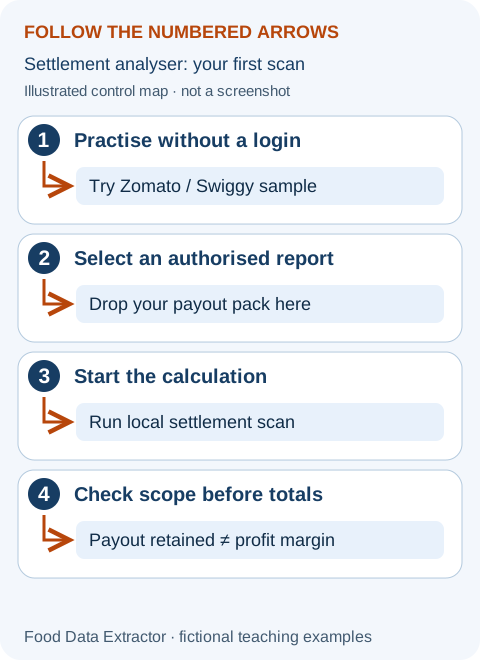
- Open the settlement analyser and use either public sample button. Confirm the synthetic-data notice and read the cycle count.
- Identify net order value, payout and payout retained. Explain aloud why retained payout is not profit.
- Open the margin calculator. Follow the worked beginner example and change food cost by ₹10 to see why ingredient evidence matters.
- Return to the readiness checklist. Tick the reporting item only after you can trace an actual authorised order through the relevant records, not merely because the sample worked.
Give the launch folder an owner
Keep separate folders for original reports, working analysis and unresolved questions. A checklist tick is a reminder, not stored evidence: this page does not save your progress. Preserve the relevant acknowledgement, contract, recipe or reconciliation privately. Name a staff member responsible for availability, another for packing checks and another for settlement review; a small team may assign several roles to one person.
Before spending on growth, test opening-hour accuracy, notification reliability, safe fulfilment and a correctly costed menu. A listing that receives orders it cannot deliver creates avoidable complaints. Use a dated action log so the first-month review can show which launch weaknesses were actually corrected.
The complete beginner tool manual explains controls, units, privacy and access limits. Examples are invented and are not platform rates or restaurant results.
A calm launch plan for someone doing this for the first time
A partner launch is several small projects happening together: permission to operate, platform onboarding, a clear menu, a working kitchen, staff responsibilities and a way to understand the money. They connect, but they are not the same approval. A delivery listing does not replace a food-business approval. A payment receipt does not prove an application was approved. A busy first day does not prove the kitchen is profitable.
The following plan follows a fictional outlet called North Window. Its owner has run a small counter and now wants to add delivery. The story is a preparation exercise, not an account of a real restaurant. Use the steps that apply to your operation and verify the current platform and government requirements separately. Keep uncertainty visible rather than checking a box to make the progress bar look complete.
Stage one: write down exactly what you are launching
Describe the menu, preparation location, hours, customer channels and operator in ordinary words. Are meals cooked at the premises, brought from elsewhere, or assembled from prepared components? Will customers eat there, collect, or receive delivery? Will another branch share ingredients or equipment? This description helps you ask the correct licensing and onboarding questions. Do not choose a category from a friend's application without checking whether your activities match.
Separate the customer's brand name from the legal business name and the authorised applicant. Keep a private reference sheet with genuine supporting records. Use the full operating address consistently in the actual official application and platform process, but do not publish personal identity or address records in a public help group. Our guides do not need those documents to explain general preparation steps.
North Window discovers that the owner had used the brand in one draft and the legal business name in another. Before submitting, the owner checks what each field actually asks and corrects the draft using genuine records. They do not edit an identity document to match the marketing name. This simple name map prevents confusion later when an invoice, approval or account statement is reviewed.
Stage two: establish the official approval path
Use the current official eligibility and document route for the real premises and activities. The FSSAI guide explains the changed 2026 framework for India and the distinction between preparation, submission and continuing duties. Check other applicable local permissions with the relevant authority. This launch checklist is not a complete legal clearance for every building, activity or jurisdiction.
Make a tracker for the actual requested documents. Put the document, responsible person, genuine source and reviewed status in separate columns. Do not label everything from a general internet list mandatory. Check the current requirements for the actual application. Before uploading, open the complete file, confirm it is readable and belongs to the correct person or premises, and follow the current official format and attestation instructions.
Record the application reference, official payment evidence and next follow-up task. Watch for queries through the registered channels. A returned application should be understood and answered through its proper process rather than automatically duplicated. If a requirement is unclear, ask a precise question with the relevant case reference through verified support. Never pay an unsolicited caller who promises guaranteed approval without independently checking the claim.
Stage three: read the commercial agreement before the menu goes live
A commercial agreement explains the arrangement with the platform. Review the charging basis, applicable services, payment timing, funded offers, cancellation treatment and support route. A commission number found online is not proof of your outlet's terms. Keep the signed or accepted version and any documented change in the private evidence folder. If a term is unclear or material, ask the platform or a qualified adviser before committing.
Check who funds a discount. A customer-visible offer may involve the restaurant, platform or another arrangement. Keep funded promotions separate from advertising and other fees. A budget setting may limit one type of spend without controlling every cost associated with the offer. Read the applicable terms and later verify the actual charge through the statement rather than assuming the setup screen is the final accounting record.
North Window wants to promote a lunch bowl. The owner first calculates its contribution on the actual included cost basis and decides the maximum test commitment. They record that a hypothetical offer is restaurant-funded in their model. This is an invented scenario, not a platform feature guarantee. They do not switch on a campaign merely because the estimated sales tile looks attractive.
Stage four: create a small, accurately costed starting menu
A starting menu should be understandable to the guest and manageable for the team. There is no universal ideal item count. Choose dishes whose recipes, ingredients, packaging and preparation can be controlled. A long list of unavailable or confusing choices is not automatically better than a smaller reliable offer. Record the current recipe and portion for each listed item so costing and packing use the same promise.
Cost usable ingredients, not just whole purchase packs. If normal preparation removes part of an ingredient, measure the usable yield and use consistent units. Include sauces, garnish and packaging that are genuinely consumed. Keep food cost and other order-variable costs separate, then combine them when calculating contribution. Do not present a food-cost-only percentage as the final amount left after all delivery expenses.
For an original example, a basket has ₹350 revenue, ₹110 ingredients, ₹15 packaging and ₹105 other included variable costs. Contribution is ₹120 before fixed expenses. If a restaurant-funded discount of ₹20 is not already reflected in revenue, contribution becomes ₹100 when it is included once. If the ₹350 was already after that discount, subtracting it again would understate contribution. Write the definition beside the worksheet.
Stage five: make the listing match the actual meal
Read the name, description, image, price, included items and required choices together. Ask a person new to the menu what they expect to receive. If they expect two sides and the kitchen supplies one, repair the description or offer before launch. Do not assume the guest will know your internal shorthand. Use plain portion and choice information rather than vague promises that sound impressive but create uncertainty.
Use photographs of the actual product or properly licensed visuals that accurately represent it. Do not copy another restaurant's dish or show extras that are not included. Keep dietary statements within the operation's trained safety controls and applicable rules. A menu editor is not a food-safety assessment. If an allergy-related request cannot be fulfilled safely, use the appropriate honest process instead of promising an unverified adaptation.
If a POS or authorised provider controls menu publication, coordinate edits through the actual source. Competing changes can overwrite one another. After publication, verify the live customer view and the internal order choices. The extension described on this website exports selected supported records; it does not automatically publish menu changes, update prices or guarantee a platform's listing approval.
Stage six: rehearse packing before demand arrives
Run a few internal preparation and packing scenarios using real recipes and the intended packaging. Include a single dish, a multi-item basket and an allowed choice that differs from the default. Follow the food-safety plan. Check whether the label or internal order reference lets the team identify the correct basket without unnecessary customer information. The rehearsal is for operations, not for generating fake sales or reviews.
Assign a final packing check: contents, included sides, appropriate sealing and the actual choice requested. Keep the check short enough to follow under normal workload. A long checklist nobody reads during a peak is less useful than a clear process designed around the common mistakes. Record any issue and change the workflow before adding demand. Do not rely on the owner being present to remember every basket.
North Window's rehearsal finds that a side is shown as included but stored at a separate station. The packer occasionally misses it. The team moves the packing instruction into the normal ticket-reading sequence and repeats the rehearsal. This is a process improvement, not proof that all future orders will be perfect. They plan to record missing-item incidents and review whether the fix holds during service.
Stage seven: assign responsibilities and safe access
Decide who checks new orders, who controls availability, who handles support, who reviews settlements and who can approve paid promotions. Use the platform's supported roles where available instead of handing the owner login to every worker. A person who needs to accept an order may not need access to bank details. Review access when staff responsibilities change and follow the business's security policy.
Write a shift handover in ordinary language. Confirm that the order device works, the menu reflects actual availability and the next responsible person knows about unresolved issues. Keep account recovery arrangements with the authorised owner or business process. Never share passwords, one-time codes, cookies or tokens with our support team or an unverified helper. The educational tools do not need those secrets to explain a file or calculation.
If an external assistant or provider helped onboard the outlet, establish a proper handover. The operator should know what was submitted, retain appropriate references and understand where official messages arrive. Do not leave the only copy of commercial terms or application evidence in somebody else's personal chat. Agree how access and records are managed without copying credentials into an insecure shared document.
Stage eight: decide how to handle a rush
Observe the station that limits output. A bottleneck is the part of the process that cannot keep up, such as cooking, assembly or packing. A weekly average does not show a short dinner surge. Record realistic preparation and handover times from internal observation, then use current authorised availability and preparation controls within the platform's terms. Do not accept work the team cannot safely fulfil merely to protect a sales target.
In a fictional two-hour peak, one station has 120 minutes of total time. After a measured allowance of 24 minutes for changeover and interruptions, 96 minutes remain. At eight bottleneck minutes per basket under this simplified model, capacity is twelve baskets. The allowance and time are invented assumptions, not industry standards. More orders than that may require a different process or demand pattern, not just a larger advertising budget.
Agree escalation steps before the rush: who notices the queue, who communicates the issue and which authorised control or internal action is appropriate. Follow food-safety and service obligations throughout. Adding a packer does not fix a cooking bottleneck unless packing was also blocking cooks. Test the actual cause rather than buying equipment or reducing staff based on an average order number.
Stage nine: build the first cash calendar
List opening available cash, expected receipts by date and committed payments by date. A settlement schedule helps plan, but an expected receipt is not yet money received. Include ingredient bills, wages, rent and other known obligations under their actual arrangements. Keep owner withdrawals, borrowing and equipment payments visible. Ask the accountant about the full treatment; this simple calendar is a timing aid, not a financial statement.
Suppose opening cash is ₹45,000, verified expected receipts before next Monday are ₹30,000 and committed payments before then total ₹80,000. The timing gap is ₹5,000. The restaurant might still have positive operating contribution, but needs to address that cash gap through realistic, lawful arrangements. Do not depend on an unconfirmed campaign forecast to cover already due payments. Early visibility allows a calmer conversation than a last-minute surprise.
Keep statutory amounts and payments you must pass on appropriately distinguished from money available for discretionary spending. A large bank balance after a deposit can include obligations that are not the owner's profit. This checklist does not calculate tax liabilities or lawful payroll. Use current official requirements and qualified help for those obligations, then put the confirmed dates and amounts into the private planning calendar.
Stage ten: learn one order-to-bank trail
After a completed settlement is available, choose a manageable cycle and match included orders, period, deductions, credits and payout reference. Then match the expected payout to the relevant bank receipt. Payment initiated and payment received can be different dates. A sales week and a settlement cycle may not align. Do not declare a fee problem simply because the same-day bank total differs from the order dashboard.
The free settlement analyser supports specified Zomato and Swiggy report formats. Open a fictional sample first, read file limits, select a supported authorised file and inspect the warnings and result definitions. It does not accept every possible document, submit a dispute or change a platform payment. Do not rename an unsupported foreign-platform export to make it resemble a supported report.
If an entry is still unclear, prepare a private support question with the relevant reference, date, amount and explanation of what does not match. Use a verified platform channel. Share only the information needed and keep the response with the working reconciliation. Our tools organise and explain supported data; they do not have authority to determine contract disputes or recover missing money.
Stage eleven: use the first days to find process failures
Track cancelled or unavailable items, packing problems, delays and support questions. Record reasons as specifically as the evidence allows. Avoid assumptions about who caused an event. A customer cancellation, ingredient shortage and missed notification require different responses. Compensation or financial treatment depends on the actual platform terms and circumstances, not on this checklist. Ask through the appropriate route when it is unclear.
North Window notices two orders affected by an unavailable topping. The first action is to connect stock information to the person managing availability. Another order missed a drink because the packing instruction was unclear. That needs a packing fix, not a stock reorder. The team records these separately so a general “improve service” instruction does not hide the actual causes.
Choose an action that can be repeated and checked. “Kitchen lead alerts availability manager when this ingredient reaches the defined reorder point” is clearer than “never run out.” The point and action must fit the real recipe and supply arrangement. Observe whether the process worked without compromising safe storage or preparation. Do not alter incident records just to make a first-week report look better.
Stage twelve: delay paid growth until you can explain the basket
You do not need to wait for perfection, but you should understand the menu, fulfilment process and included contribution before funding more demand. A campaign can amplify a confusing listing or a bottleneck as easily as it can amplify a reliable offer. Decide what problem the campaign is meant to address and how its actual cost will be measured. More attributed sales are not automatically more profit.
For an original comparison, a baseline has 80 orders contributing ₹150 each before advertising, giving ₹12,000. A test has 110 orders contributing ₹130 each after funded discounts but before advertising; subtract ₹3,000 campaign spend and the result is ₹11,300. Orders increased while this limited contribution comparison fell by ₹700. Other changes may affect the result, so do not use it as proof that all advertising is ineffective.
Keep the baseline period, available hours, menu and unusual conditions visible. Record spend actually charged, not merely the budget entered. If a promotion or fee was already removed in a payout-based view, do not remove it again. A complete sales-based analysis needs its own consistent reconstruction. The promotion guide explains how to keep these views apart.
Stage thirteen: make the review understandable to somebody else
Ask a colleague to explain the launch folder and first calculations. Can they find the genuine agreement, the approval reference, current menu version and source of each financial input? Can they distinguish order counts from item counts and sales from bank cash? If not, add a short plain-language note. The purpose is not to test the colleague; it is to make the process robust when the owner is absent.
Keep the most important decision near the top of meeting notes, with evidence below. Avoid a report full of abbreviations whose meaning depends on one person's memory. Define a term once and then use ordinary language. A manager should be able to understand what happened, why it matters, what must be done and who owns it without reopening every message exchanged during onboarding.
Do not include unnecessary customer details or staff personal information in a general operating summary. The source files may contain sensitive records, so restrict them to authorised people and follow the business's retention policy. Use invented figures for public learning questions. If a support issue requires private evidence, use the verified channel and minimum necessary information rather than posting the entire launch folder.
Stage fourteen: know what the tools do and do not do
The extension helps authorised users export selected records from supported Zomato and Swiggy partner pages. It does not obtain a government approval, connect to a bank, create customer demand or automatically update a menu. The settlement analyser helps inspect supported export structures. The margin calculator tests manually entered values. None of them replaces the actual agreement, complete accounting records or food-safety supervision.
For a new user, practise in that order: understand the type of record, use a fictional sample, read the result label and check a simple number by hand. Only then use a supported real file or carefully chosen private inputs. Do not send passwords or tokens to make an export work. If the platform interface changes or the report does not match a supported structure, stop and describe the issue safely.
DoorDash and Uber Eats extractor enquiries are welcome through support, but those integrations are currently not available in the extension. Contact is a discussion of a possible requirement, not an installable tool or a delivery commitment. Overseas users should use relevant local-currency worksheets and authorised platform reports rather than assume the rupee-based main calculator automatically fits their contracts.
Prepare for a device or connection failure
A launch plan should include what the team does when the order device stops working or the connection becomes unreliable. Use the platform's current authorised help and controls to understand the available options. Do not invent an unofficial way to accept or change an order outside the permitted process. Make sure the person on shift knows who can escalate the issue and where verified support can be reached.
Keep a brief internal incident note with time, affected service period and action taken. Do not include unnecessary customer details. When service resumes, check order status and availability carefully rather than assuming every screen caught up correctly. A connection problem can create discrepancies between what a worker remembers and what the system recorded. The actual platform record and support response need to be checked before making a financial claim.
After the incident, review prevention within your own operating scope: device readiness, shift responsibility, appropriate charging or power arrangements and a clear escalation route. This is not a promise that any setup eliminates outages. The goal is to make a predictable response available so staff do not improvise unsafe or unauthorised workarounds during a rush.
Use a spending decision sheet before buying more equipment
A busy first weekend can make a new oven or extra packing bench feel urgent. First identify the repeated bottleneck through observation. How much time is lost, which tasks are affected and which sales could actually be fulfilled if the constraint changed? A piece of equipment that saves preparation time outside the peak may not solve the queue that occurs at the cooking station. Check safe space, installation and other applicable requirements before purchasing.
For an original simplified calculation, equipment costing ₹30,000 might create ₹3,000 of additional monthly contribution after its additional operating costs, if the expected demand actually occurs. Dividing ₹30,000 by ₹3,000 gives ten months before considering financing, tax, maintenance, downtime and other factors. This is not an investment recommendation or a forecast. Test the demand and cost assumptions, and ask for professional advice where the commitment is significant.
Keep a “do nothing yet” option beside the purchase. Perhaps a clearer packing sequence or a smaller launch range addresses the repeated delay at lower cost. Compare quality and safety as well as money. An equipment decision should state what evidence would justify spending and which assumption could invalidate it. Do not buy merely because a dashboard shows high gross sales during one unusual event.
Keep changes small enough to review
At the end of the first week, write one process change you can explain and one financial question you still need to resolve. Do not redesign the kitchen, menu and campaign together because the opening felt chaotic. Small changes make it easier to identify what helped. Keep a review date and a stop condition if the change creates stock-outs, service failures or costs beyond the planned limit.
Invite the people doing the work to explain the constraint. A packer may know that labels become hard to distinguish; a cook may know that one modifier repeatedly interrupts preparation. Listen without assuming every problem is staff carelessness. Verify the observation and choose a practical response. A launch process that relies on blame tends to produce hidden incidents rather than better records.
Use the checklist again after the first corrections, but retain the private notes describing why a box became complete. A progress percentage is not the measure of commercial success. The stronger result is a restaurant whose team can fulfil the offer, trace the money and ask precise questions when something does not fit. That is the foundation for the first-month dashboard and the later weekly review.
Reader exercise: choose a safe launch decision
You have a clear menu and an approved listing, but the packing rehearsal misses side choices and the first recipe costs are guessed. Should you immediately fund a large campaign? A safer next action is to repair the packing process and establish costs for the intended promoted baskets. The listing's existence does not establish operational readiness. A bounded test can come later when the team can fulfil and explain the offer.
You have a payment receipt for an application but cannot identify its approval status. Should the checklist show the approval complete? No. Check the official account and actual requirements, and distinguish submission, payment and issued approval. The progress bar is an educational aid, not an authority's decision. Mark the uncertainty and assign the next verified check rather than using a tick to hide it.
You see ₹20,000 sales and ₹14,000 bank cash in the first week. Is the ₹6,000 gap your commission? Not necessarily. First match periods and orders, then classify deductions, credits and timing. The gap may include several different items. Use one completed settlement trail and a precise support question where necessary. A clear explanation is a better launch outcome than an impressive but unsupported percentage.
North Window, every amount and each incident are fictional teaching exercises. The workflow provides preparation and operating checks, not guaranteed platform approval, legal clearance, profit or growth. Confirm current requirements through the official sources already linked in this guide.