
FEES & TAX GUIDE
How to read platform fees, GST and invoice records in a restaurant payout
A payout can contain several different tax and fee relationships. Treating every negative row as “commission” hides errors and makes invoice matching difficult. A better method separates the customer transaction, the platform’s services, statutory withholding and non-order adjustments.
Use economic categories, not one deduction bucket
Create a chart of settlement categories that maps the source label to a stable internal category. Typical groups include commission or marketplace service, payment service, logistics or delivery service, advertising, funded discount, cancellation or refund, penalty, reimbursement, GST on services and tax withheld. Your agreement may use different labels or include only some groups.
Do not assume a row’s tax treatment from its sign. A customer tax collection, GST charged to the restaurant on a service invoice and a withholding entry have different meanings even when all affect the cash movement.
Separate the three tax questions
- Tax on the food or restaurant supply: identify how the order report and settlement present it.
- GST on services purchased from the platform: match the taxable value and tax amount to the relevant service invoice.
- Withholding or collection: reconcile the settlement entry to the applicable certificate or ledger and your adviser’s treatment.
Indian indirect-tax rules and e-commerce arrangements can change and depend on facts. This guide explains reconciliation structure, not the tax position for a particular outlet.
Worked invoice match
Suppose a monthly service invoice shows commission services of ₹20,000 and another eligible service of ₹5,000, for a taxable value of ₹25,000. At a sample tax rate shown on that invoice, GST is ₹4,500, so the invoice total is ₹29,500. If settlement deductions include ₹20,000, ₹5,000 and ₹4,500 for the same invoice period, the service invoice is fully represented. If settlements show ₹30,200, investigate the ₹700 difference by date, service type, credit note or prior-cycle carry-forward.
| Control | Source | What it proves |
|---|---|---|
| Order revenue and status | Order report | Customer-side activity |
| Service taxable value | Platform invoice | Fee basis |
| GST on services | Platform invoice | Tax charged on services |
| Deduction timing | Settlement rows | Cash recovery |
| Credit notes | Invoice records | Reversals or corrections |
| Net receipt | Bank statement | Cash confirmation |
Common sources of mismatch
- An invoice uses calendar dates while a payout uses settlement cycles.
- A credit note is issued in a later month than the original fee.
- Advertising or logistics is invoiced separately from commission.
- The settlement contains a prior-period adjustment.
- The exported file displays a tax-inclusive total while the invoice separates taxable value and tax.
- Rounding occurs at order, invoice or cycle level.
Preserve an audit trail
Store the raw settlement, invoice and credit-note files with their original names. In your reconciliation workbook, add the source file, source row or identifier and internal category for each transformed line. Do not edit raw values to force a match. Record an adjusting explanation with evidence.
For profitability analysis, avoid counting GST on a service twice—once inside a tax-inclusive fee and again as a separate tax row. Conversely, do not remove a real cash charge merely because it may later qualify for input credit. Cash, accounting expense and tax credit are separate views.
EVIDENCE MAP
Match each deduction to the document that explains it
| Settlement label | Evidence to inspect | Do not assume |
|---|---|---|
| Commission or service fee | Commercial agreement and service invoice | That one percentage applies to every order |
| GST on a platform service | Tax invoice or credit note | That it is the same as tax on the restaurant supply |
| Withholding or collection | Statement, certificate and tax ledger | That it is a permanent operating expense |
| Restaurant-funded offer | Campaign terms and order-level funding split | That the platform funded the displayed discount |
| Adjustment | Linked order, ticket, memo or prior-cycle record | That a generic label is sufficient evidence |
A repeatable invoice check
- Record invoice number, service period, taxable value and tax amount exactly as issued.
- Group settlement deductions by the same service type and covered dates.
- Record credit notes separately; do not net them invisibly into fees.
- Explain differences by timing, rounding or documented adjustment.
- Ask a qualified adviser about tax treatment; the reconciliation only proves where an amount came from.
Sources and further checks
- CBIC Circular 167/23/2021-GST — official clarification on restaurant services supplied through e-commerce operators.
- CBIC FAQ on tax collection at source — general official background; applicability must be checked for the specific transaction and current law.
Sources support the stated regulatory or methodological context. They do not determine the treatment of a particular outlet, contract or transaction.
Frequently asked questions
Are all negative settlement rows expenses?
No. Some may be tax movements, withholding, customer refunds, repayment of an earlier credit or timing adjustments. Classify from the supporting record.
Can I use one commission percentage for forecasting?
Only as a labelled assumption. Actual effective cost can vary by item, offer, service, contract and tax. Compare the forecast with realised settlement data.
Why does an invoice month not equal a payout month?
Orders, invoice periods and bank settlements can use different cut-offs. Reconcile through IDs and covered dates rather than month name alone.
PRACTISE WITH EVIDENCE
Read a deduction without confusing fees, tax and cash timing
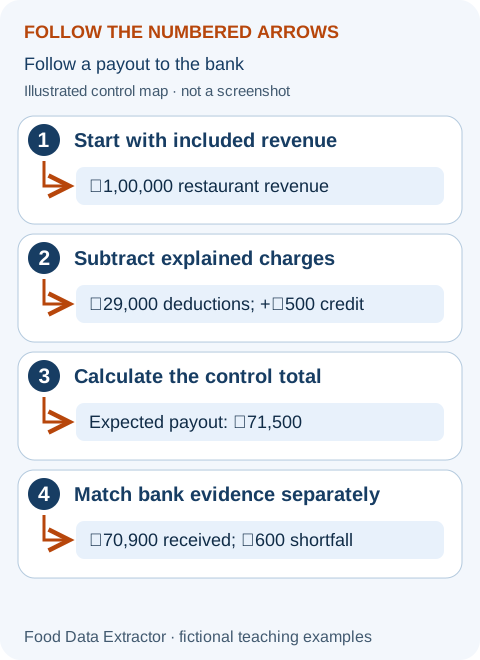
A simple invoice bridge for a new partner
Imagine defined restaurant sales of ₹1,00,000 and a service invoice showing ₹20,000 taxable services plus ₹3,600 tax. The all-in invoiced service charge is ₹23,600. One person may describe the taxable service as 20% of sales; another may describe the tax-inclusive cash charge as 23.6%. Both calculations can be arithmetically correct, but they answer different questions. Label the numerator before comparing them.
If the same statement also withholds ₹100, do not rename it “extra commission.” Establish what tax, certificate or adjustment supports the row. A recoverable withholding can change immediate cash without being the same as an operating expense. This guide cannot determine whether a specific tax credit is available to your restaurant; that depends on current rules and the outlet’s facts.
How to use the settlement analyser for this question
- Open the settlement analyser. For a first attempt, use “Try Zomato sample” or “Try Swiggy sample” rather than your private files.
- Look at the detected platform, included cycle count and adjustment categories. A tax-deductions total is a category supplied by the report parser, not a legal conclusion about every underlying row.
- For your own supported file, choose the report and click “Run local settlement scan.” Confirm the covered dates and read any warning before using a total.
- Match material charges back to actual invoices or credit notes outside the tool. The analyser does not log in to GST systems, file a return, decide input-credit eligibility or automatically inspect your bank statement.
Use the margin calculator without double-counting tax
The margin calculator applies “Tax on commission” to the calculated commission amount. It does not apply that percentage automatically to every fixed platform or payment fee. If another service is taxed, include the documented all-in cost in the corresponding per-order field or a labelled other deduction. Never place the same tax in both places.
For an all-in fixed charge, a percentage zero in a simplified scenario means “already included elsewhere,” not “legally exempt.” The tool is a planning model and does not select the correct rate. Replace its defaults using invoices and the accountant’s agreed treatment. The beginner manual shows how cash withholding stays separate from the operating-income calculation.
Prepare a support ticket someone can answer
Write “Invoice X covers this service period and totals ₹29,500; these linked settlement rows total ₹30,200; please explain the ₹700 difference,” rather than “your fees are too high.” Include the relevant invoice and cycle identifiers through the authenticated support channel. Keep bank details, customer information and unrelated documents out of any public community post.
Keep an unresolved row in an exception log with an owner and review date. When a later credit note explains it, link that note rather than changing the original statement. CBIC’s restaurant/e-commerce clarification distinguishes the restaurant-supply relationship from other services. It is a source to discuss with an adviser, not a blanket percentage to paste into all fee fields.
Walkthrough and arithmetic checked 3 October 2026. The complete beginner tool manual explains controls, units, privacy and access limits. Examples are invented and are not platform rates or restaurant results.
Educational information, not tax advice. Confirm current treatment with authorised invoices and a qualified professional.