
RECONCILIATION GUIDE
How to reconcile a restaurant settlement without losing the order trail
A settlement statement is not simply a sales report. It is a bridge between customer orders, platform adjustments, service invoices and the amount that reaches the bank. A useful reconciliation proves each stage of that bridge instead of comparing only total sales with total payout.
Start with four separate records
Collect the order-level report, the settlement or payout statement, fee and tax invoices, and the bank statement for the same period. Keep each source separate. The order report explains what customers ordered; the settlement explains how payable value was calculated; invoices support service charges and their GST; the bank statement confirms cash receipt.
Use a stable matching key. Order ID is normally the best key for order-related rows, while settlement ID or UTR is better for matching payout cycles to the bank. Do not force invoice-level charges onto individual orders unless the source provides a reliable allocation key.
Build the settlement equation
The exact labels vary. Classify rows by economic meaning, not by their position in a CSV. A packaging charge collected from a customer is revenue only if it belongs to the restaurant. GST collected on food may be handled differently from GST charged on platform services. Check your contract and invoices before deciding.
A worked example
Assume the included orders produce ₹100,000 of restaurant revenue. The restaurant funds ₹4,000 of discounts. Commission and other taxable platform services are ₹20,000, GST on those services is ₹3,600, refunds and penalties are ₹1,400, and reimbursements are ₹500. The expected payout is ₹71,500. If the bank shows ₹70,900, the unexplained difference is ₹600—not ₹29,100. The larger number consists mostly of known deductions.
| Component | Amount | Treatment |
|---|---|---|
| Restaurant revenue | ₹100,000 | Starting value |
| Funded discounts | −₹4,000 | Deduction |
| Platform services | −₹20,000 | Deduction |
| GST on services | −₹3,600 | Deduction |
| Refunds and penalties | −₹1,400 | Deduction |
| Reimbursements | +₹500 | Credit |
| Expected payout | ₹71,500 | Control total |
Investigate differences in the right order
- Date boundary: an order placed at month-end may settle in the next payout cycle.
- Status: cancelled, rejected and refunded orders should not be treated as fully delivered revenue.
- Duplicates: one order can have multiple transaction rows; aggregate by transaction type before summing.
- Tax basis: separate tax on food from tax on platform services and withholding entries.
- Carry-forwards: prior-cycle adjustments can appear in a later statement.
- Bank timing: the settlement date and value date may differ.
Use a reconciliation control sheet
For every payout, record its settlement ID, covered dates, gross included order value, each deduction category, each credit, expected payout, bank amount and variance. Preserve the raw exports unchanged and perform transformations in a separate workbook. That makes the process repeatable and lets another person trace a number back to source.
PRACTICAL CONTROL
Use a three-way tie-out, not one total
A dependable control links three independent views: eligible order activity, the platform settlement calculation and the bank credit. Record the source period and identifier for each view before comparing numbers. If dates or identifiers do not align, label the difference as timing rather than forcing it into a fee category.
Minimum fields for every payout cycle
- Settlement or payout ID
- Order eligibility dates
- Gross restaurant-owned revenue
- Restaurant-funded discounts
- Fees before tax
- GST shown on service invoices
- Refunds, penalties and credits
- Withholding or collection entries
- Expected payout
- Bank amount and UTR/reference
- Unexplained variance
- Evidence or owner for follow-up
How this example was checked
The figures are illustrative and contain no restaurant or customer data. The expected payout was independently recalculated from the displayed components, and the variance is the bank amount minus that control total. The method deliberately avoids assuming that a negative line is commission or that an order date belongs to the same payout cycle.
Sources and further checks
- Reserve Bank of India: NEFT frequently asked questions — reference material for bank-transfer identifiers and confirmation.
- CBIC Circular 167/23/2021-GST — official clarification concerning restaurant services supplied through e-commerce operators.
Sources support the stated regulatory or methodological context. They do not determine the treatment of a particular outlet, contract or transaction.
Frequently asked questions
Should item sales equal settlement sales?
Not always. Item reports may use order date while settlements use payout eligibility or delivery date. They may also exclude taxes, packaging, cancellations or adjustments. First align scope and definition.
Can I reconcile without order-level data?
You can prove the payout cycle at an aggregate level, but you cannot fully attribute every difference to a specific order. Mark that limitation instead of inventing a link.
Does the free analyser upload my statement?
No. The current web analyser reads supported files locally in the browser. Review the preview and classification before relying on its totals.
PRACTISE WITH EVIDENCE
Your first settlement scan: buttons, outputs and next actions
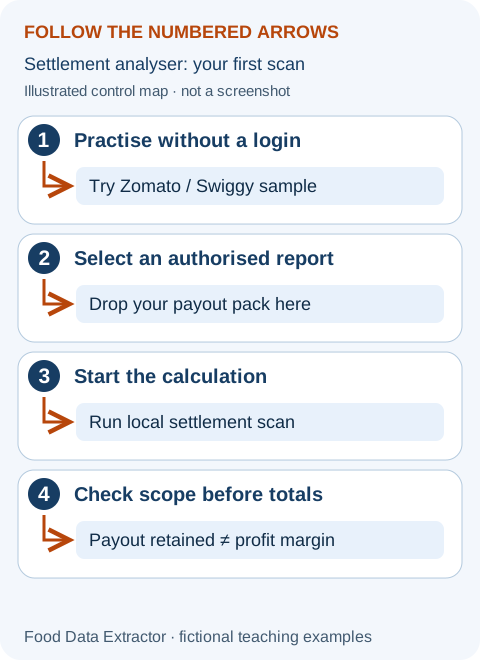
Try a public example before choosing a private report
Open the free settlement analyser and click “Try Zomato sample” or “Try Swiggy sample.” These buttons load invented teaching files. No partner account or activation key is needed for the sample. If results are already displayed, confirm whether to replace them; the tool does not alter your original selected file.
The analyser answers “what does this supported settlement report contain?” It does not answer “did my bank receive the money?” by itself. A platform status saying paid and a masked reference are useful matching evidence, but you still need an independent bank confirmation for the actual account and transfer. Do not mark reconciliation complete merely because a screen contains a green number.
Analyse your own file in a controlled order
- Download a report you are authorised to access and keep an unchanged original. The export-format guide explains supported JSON, tabular CSV and exporter ZIP structures; an arbitrary PDF, photo or spreadsheet is not automatically supported.
- Click “Drop your payout pack here” to select a file, or drop it into the file area. Selection alone is not the calculation.
- Click “Run local settlement scan.” Read the status message. The free mode processes one file up to 15 MB and displays up to three cycles. Confirm the displayed “analysed” count before describing the result as a monthly total.
- Check the detected platform and compare one cycle against the original report. Read warnings, missing fields and statuses before accepting aggregate totals.
- For batches, all cycles and the reconciliation CSV, check the subscription requirements. Do not assume the free sample unlocks paid functions.
Interpret the screen without inventing a profit figure
Net order value is the report’s sales basis. Net payout is its cash-settlement amount. Net deductions show their difference after the available adjustments. Payout retained divides payout by net order value. None of those values includes your complete ingredient, packing, rent and payroll costs. Use the separate margin calculator for an operating scenario.
In this guide’s ₹71,500 expected-payout example, a bank credit of ₹70,900 creates a ₹600 shortfall against the control, not a ₹29,100 unexplained commission. Check whether the transfer was split, an adjustment belongs to a different cycle, or the bank value date differs. If no evidence explains it, retain the ₹600 exception and ask the platform through authenticated support. The analyser does not automatically import the bank credit, so record that comparison in your private control sheet.
A good finished reconciliation has a trail
For every material exception, preserve the raw filename, payout or invoice identifier, calculation, explanation and closure evidence. Two files can contain the same cycle, so repeated appearances are not automatically additional revenue. The parser deduplicates supported cycles, but you should still verify source coverage and identifier consistency.
When a file is rejected, do not rename it to JSON and hope it works. Read the troubleshooting guide and compare its headers or structure. Share only a safely redacted structural example with support; never send a partner password, OTP or a full unmasked bank statement. Review the illustrated beginner walkthrough whenever a new staff member takes over the process.
Walkthrough and arithmetic checked 3 October 2026. The complete beginner tool manual explains controls, units, privacy and access limits. Examples are invented and are not platform rates or restaurant results.
Educational information only. Platform terms and tax treatment vary; verify your contract, invoices and professional advice.