
FIRST-MONTH CONTROL ROOM
Your first 30 days on Zomato or Swiggy
The first month should answer more than “how many orders did we get?” Track demand, payout retention, promotion spend and item contribution together. That makes it easier to tell a launch problem from a pricing, menu, advertising or operating problem.
Choose a section in this guide
Interactive first-month snapshot
Enter figures for exactly the same date range. For a platform comparison, run each platform separately. Payout minus food and packaging is used here as a deliberately simple contribution view; it is not an accounting profit statement.
How the six outputs help
| Output | Use it to ask | Do not assume |
|---|---|---|
| Average order value | Are customers buying a meal or only one low-value item? | A higher basket is automatically profitable. |
| Payout retained | How much of reported sales reached this settlement? | The missing share is one universal commission. |
| Sales-to-payout gap | Which discounts, services, ads, refunds and tax movements explain it? | Every rupee is an expense; timing and withholding may be present. |
| Deduction rate | What share of reported sales did not reach this payout? | It measures profit loss; it is the complement of payout retained and can include timing or tax movements. |
| Promotion load | How much of sales is associated with restaurant-funded discount and ads? | Attributed sales or ROAS equals profit. |
| Contribution per order | Does an order help pay fixed expenses after the simplified costs entered? | This is final net profit. |
A four-week learning plan
Verify the listing and order flow
Check menu accuracy, opening hours, notification reliability, preparation steps and the first order-to-bank trail. Write down any closure or operational interruption.
Find demand patterns
Compare day and meal period. Separate new and repeat customers where authorised aggregate reporting is available. Do not copy or store personal customer information.
Test menu economics
Cost the most ordered items and the items with the highest sales value. Compare contribution per order and total contribution—not food-cost percentage alone.
Choose one controlled change
Improve availability, description, photo, combo, price or promotion based on the strongest evidence. Set a review date and success measure before making the change.
Diagnose the pattern before acting
Orders low, conversion weak
Check category, availability, item names, descriptions, images, price clarity and customer experience. Menu quality tools can identify catalogue gaps, but an improvement still needs measurement.
Sales healthy, payout weak
Reconcile identical order and settlement periods. Classify funded discounts, services, advertising, refunds, tax and adjustments before blaming one fee.
Payout acceptable, profit weak
Look beyond the platform statement: recipe yield, ingredient purchase price, packaging, waste, labour, rent and capacity can absorb the remaining contribution.
ROAS strong, contribution weak
Attributed revenue is not incremental profit. Compare the promoted orders with a baseline, then subtract funded discounts, advertising and other variable costs.
Example: why weekly context matters
Suppose the month shows 400 orders, but the outlet was closed for four dinner services in week two. A simple monthly average makes demand look uniformly weak. A day-and-meal-period table shows that dinner demand remained strong when the kitchen was open. The immediate action is to fix availability and staffing before spending more on acquisition.
Now suppose ads produced 120 attributed orders and ₹72,000 attributed sales from ₹12,000 spend, a reported 6× ROAS. That sounds positive, but it is not yet profit. If many of those customers would have ordered anyway, or if discount, platform charges, ingredients and packaging consume the basket, the incremental contribution may be small. Compare with a similar non-campaign period and keep the assumptions visible.
Where to get help
Listing, account or order issue
Use the authenticated Restaurant Partner or Owner app first, keeping outlet ID, order ID and the exact date ready. This is safer and more traceable than an unverified contact.
Zomato onboarding overviewMenu quality question
Swiggy’s Menu Score guidance explains how category, images and combos can support discoverability. Review the current tool inside the Owner app.
Swiggy Menu Score guideSettlement does not match
Start with included order IDs and settlement dates, then use the platform support route for a specific unexplained entry.
Use the settlement analyserTax or licence question
Use official FSSAI and GST sources, then consult the restaurant’s accountant or adviser for outlet-specific treatment.
FSSAI business informationSources and further checks
- Zomato: Restaurant Partner onboarding and early success support.
- Swiggy: self-serve ad setup, targeting and campaign tracking.
- Swiggy: Smart Links and channel insights.
- Zomato: sponsored-listing terms and campaign-budget context.
- Our guide to discount and advertising economics.
Campaign features and terms can vary over time and by outlet. Use the current authenticated dashboard and signed campaign terms as the controlling evidence.
Frequently asked questions
What is a good payout-retained percentage?
There is no universal good percentage. The result depends on the revenue basis, outlet contract, funded promotions, ads, refunds and tax movements. Use it as a trend and reconciliation prompt, not a score.
Should I combine Zomato and Swiggy figures?
Review each platform separately first because report fields, dates and commercial arrangements can differ. Combine them only after standardising definitions and retaining the original source.
Does this dashboard calculate net profit?
No. It omits fixed payroll, rent, utilities, licences and other overhead, and it assumes the payout belongs to the same included orders. Use it to locate the next question, not prepare statutory accounts.
How often should a new partner review performance?
Check operational exceptions daily, settlement inclusion when each payout arrives, and the connected dashboard weekly. A monthly review is useful after the weekly records are complete.
PRACTISE WITH EVIDENCE
Read the starting dashboard like a new manager
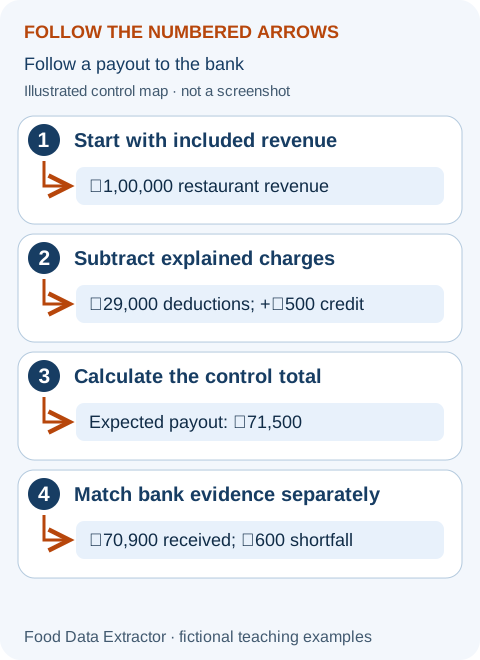
Check the sample before replacing it
The starting numbers represent an invented first month: 400 completed orders, ₹2,40,000 sales, ₹1,58,000 payout, ₹18,000 funded discounts, ₹12,000 advertising, ₹76,000 ingredients and ₹12,000 packaging. Click “Recalculate snapshot” to connect the inputs with the six result cards. Average order value is ₹600. Payout retained is about 65.8%, and the sales-to-payout gap is ₹82,000.
The simplified contribution per order is ₹175: (₹1,58,000 − ₹76,000 − ₹12,000) ÷ 400. Funded discounts and advertising inform promotion load, but are not subtracted again from the payout-based contribution card. This assumes they are already represented in the payout for the same orders. If they were billed separately, or the payout contains other periods, the simplified result is not a complete contribution measure. Investigate that scope before making a decision.
Replace inputs using one shared date boundary
- Decide whether the snapshot follows included orders or settlement cycles. Match the payout to those same orders; a calendar-month bank total may not belong to calendar-month sales.
- Run Zomato and Swiggy separately. Keep the platform, outlet, open days and known closures beside your figures.
- Recalculate and choose the biggest unanswered question. An ₹82,000 gap should lead to invoice and settlement checks, not an assumption that the entire gap is commission.
- Use the settlement walkthrough for cash adjustments, and the margin walkthrough when you need food, packaging and overhead in an explicit operating model.
A practical review conversation
Ask the shift lead about closed services, the kitchen lead about recipe yield and remakes, and the person responsible for accounts about unsettled cycles. Keep each answer linked to a record. If orders dropped only when a signature item was unavailable, fix availability before testing an ad increase. If demand stayed stable but contribution fell, inspect costs and funding instead.
The dashboard does not save the month or connect automatically to either platform. Preserve a private copy of your reviewed inputs and actions. On the next review, compare the same definitions and include the previous action’s owner and outcome—not just a fresh set of colourful numbers.
The complete beginner tool manual explains controls, units, privacy and access limits. Examples are invented and are not platform rates or restaurant results.
Your first month, explained through the decisions you actually face
Opening a partner dashboard for the first time can feel like entering a room where everybody else knows the language. There are sales totals, order counts, payouts, campaign numbers and warnings. You do not need to understand every chart on the first day. You need to know which number answers your immediate question, where it came from and what it cannot tell you. This workshop turns the first month into a sequence of small, checkable decisions.
We will follow a fictional new outlet, Corner Bowl. It already has the approvals and operating arrangements needed for its actual location; this story does not establish anyone else's legal readiness. It begins delivery with a small menu and keeps its offline counter open. The owner uses authorised account access and collects only the records needed to run the business. Every amount and event in this workshop is invented for teaching.
Before the first order: agree what success means
The owner says, “I want more orders.” The kitchen lead asks, “At what time, for which dishes, and with how much money left?” Both questions matter. A delivery channel can add useful demand during a quiet period or create a queue during an already busy lunch. Define success as a combination of reliable service, understood contribution and manageable cash timing. A large order count by itself does not settle those questions.
Write three first-month goals you can observe without guessing. Examples are: every listed item can be prepared as described; every completed settlement has an explained order-to-bank trail; and the most sold dishes have current recipe and packaging costs. These are learning goals, not promises of a particular revenue level. The first month may include quiet days, corrections and failed tests. Treat those events as information rather than reasons to change everything at once.
Set limits before paying for growth. Decide who can authorise a promotion, which amount they can commit, and how they will review its effect. A spending limit is not the same as a forecast of profit. Keep core operating commitments separate. If cash is tight, find the payment dates and existing bills first; expected future orders should not be treated as money already available to spend.
Day one: test the journey from menu to kitchen
Review your public listing in the way a customer would. Is the item name understandable? Does the description match what is packed? Are portions, choices and unavailable items clear? A description that says a meal includes two sides must match the actual order assembly. Do not use a sample photo from another restaurant simply because it looks attractive. Accurate expectations can prevent avoidable complaints before you analyse a single campaign.
Inside the authorised partner account, check operating hours, order notifications and staff access. Explain who accepts orders, who watches changes and who confirms availability. Portal layouts can change, so use the current controls and platform help rather than memorising the position of a button shown in an old video. Do not share the owner password with everyone on shift; use supported roles and access arrangements where available.
Run an internal preparation rehearsal using the real dish and packaging. Follow the business's safe preparation and handling plan. Record the sequence: order received, choices read, preparation started, packing checked and handover ready. This is not a reason to place deceptive orders or manufacture reviews. The rehearsal is a way to identify operational confusion before a real guest has to experience it.
Day two: create a small source map
A source map is a list of where each input comes from. Put completed order counts beside their report name, sales beside their definition, payouts beside the statement period, and bank receipts beside their references. For recipe costs, name the supplier invoice and recipe version. This avoids the common situation where a number is copied into a sheet and nobody remembers whether it included tax, refunds or discounts.
For Corner Bowl, the owner keeps an order-sales export, a settlement statement and a private bank reconciliation separately. The kitchen lead maintains ingredient and packaging costs. The owner does not paste every record into a public chat for advice. If support needs an order reference, it is shared through the verified private support route and only to the extent necessary. General learning questions can usually use invented or redacted figures.
Write the currency and period at the top of the sheet. This dashboard uses rupees and a deliberately simplified payout-based diagnostic. It is not a foreign-currency converter or automatic connection to a delivery platform. If a different report or country uses different definitions, do not rename a column and assume the calculation becomes valid. Use a worksheet whose scope you understand and retain the original source separately.
Days three and four: learn the difference between an order and an item
One order may contain one dish or several dishes. Average order value is total sales divided by completed orders on the same defined basis. Item popularity is the number of units sold for a specific dish. Mixing those counts makes both demand and recipe usage confusing. Keep cancelled orders, completed orders and sold item units separate before comparing them. Use the platform's current report definitions for the actual statuses.
Suppose Corner Bowl completes 40 orders containing 70 bowls and 20 drinks. If sales are ₹16,000, average order value is ₹400 per order. It is not ₹177.78 per order from dividing by all 90 items. Item-level recipe usage still needs those 70 bowl units and 20 drinks. The same business therefore needs both order counts and item counts, because they answer different questions.
If five customers ordered two bowls each, their order count is five and bowl count ten. An item price change might alter basket size as well as order count. Do not assume a higher average order value means customers bought more items; a changed mix or price can cause it. Record average basket value alongside item quantities and the relevant price basis so you can explain the movement rather than celebrate the larger number automatically.
Days five to seven: close one small settlement trail
Start with one completed settlement cycle you can identify. Match included orders to its dates and source references, then classify the deductions and credits. Compare the stated expected payout with the relevant bank receipt. An order completed on Sunday may be paid in a later cycle; the first bank payment may contain adjustments from another period. The exact timetable depends on the platform and the outlet's arrangements.
Do not declare missing money because today's sales exceed today's bank deposit. First check whether those orders belong to a completed payout and whether the payment was initiated or received. Check references and any split transfers. If an entry remains unexplained, write a specific question: the order or payout reference, amount, date and reason it appears inconsistent. A support case with evidence is more useful than “your deductions are too high.”
The settlement analyser can help inspect supported Zomato and Swiggy exports. Begin with its fictional sample and read the supported file types before using your own authorised data. It does not create a bank connection, resolve a dispute or guarantee that every contract-specific field is interpreted. Read any warning and keep a manual check of the important totals. Unsupported exports should not be forced into another platform's format.
Week one exercise: use the snapshot without overclaiming
Take an original example of ₹50,000 defined sales across 100 orders and ₹35,000 payout on the chosen matching period. Average order value is ₹500; payout retained is 70%; the sales-to-payout gap is ₹15,000. Those figures tell you that the gap needs classification. They do not prove a 30% commission rate. The difference may contain several services, funded incentives, refunds, tax-related movements and adjustments.
If recipe ingredients and packaging together cost ₹19,000 for those orders, payout less those costs is ₹16,000, or ₹160 per order. This is a payout-based screening amount, not a final profit statement. It can be distorted by settlement timing and by items missing from the chosen scope. Do not subtract a fee already included in the payout a second time unless you are deliberately rebuilding a separate sales-based calculation.
Now imagine ₹4,000 of that payout relates to earlier orders. Removing it from this period leaves ₹31,000 matching the current orders, and the screening amount becomes ₹12,000. The arithmetic was not wrong; the original period match was wrong. This is why the source map and cut-off matter before you decide whether a menu price or promotion needs changing.
Week two: find meal periods, not just daily totals
Split the day into meaningful service periods, such as lunch and dinner, using a consistent local-time boundary. A strong dinner can hide a lunch problem in the daily total. A twenty-minute dinner surge can also overload a kitchen even when average hourly orders look comfortable. Record opening hours and closures so that a day with fewer available trading hours is not treated as a directly comparable full day.
Suppose Monday has 20 orders over eight available hours and Tuesday has 18 over four hours because of a planned closure. Monday has more total orders, but Tuesday has greater orders per available hour in this limited comparison. That does not prove Tuesday's menu is better; the periods, customer demand and kitchen capacity differ. It does show why a raw daily ranking can point the owner toward the wrong explanation.
Keep a short note of conditions: rain, holidays, a local event, equipment failure or a sold-out dish. Do not turn every unusual event into an excuse, but do not erase it either. A first month is a small sample. Describe patterns as preliminary and test them against later comparable services rather than pretending thirty days provide a permanent map of demand.
Week two: investigate cancellations without assuming fault
Separate cancellation reasons using the available authorised report and operational records. An unavailable item, missed notification and customer cancellation are different problems. Payment or compensation rules depend on the actual platform terms and circumstances, so do not infer entitlement from an educational chart. Use the verified support route when a financial treatment is unclear, retaining the relevant evidence without exposing customer details publicly.
Corner Bowl finds four unavailable-item cancellations after a popular topping ran out. The first response is to connect the kitchen's stock signal to the person managing menu availability, not to buy advertising. They agree who pauses the item and who re-enables it when genuinely available. The process should respect platform controls and food-safety checks. It should not show an item as available merely to protect a metric.
Another cancellation happened because the notification device was not checked during a staff change. The remedy is a shift handover task: confirm who watches new orders, whether the device works and how to escalate a problem. These operational fixes cost little compared with a campaign, but they still need observation. Record whether the same failure repeats before calling the process solved.
Week three: cost the dishes people actually buy
Begin with the items responsible for the largest share of sales or preparation work. Record the current recipe, usable quantities, purchase cost and packaging. Do not use a guessed percentage for the whole menu when one dish has very different ingredients and yield. If supplier costs changed halfway through the month, explain which cost version the comparison uses. This is a learning worksheet, not a replacement for the accountant's inventory method.
For a fictional ₹300 basket, ingredients cost ₹95, packaging ₹15 and other included order-variable costs ₹90. Contribution before fixed costs is ₹100. If an advertised discount is already included in the revenue figure, do not subtract it again. If revenue is before that restaurant-funded discount, include it once in the costs or a separate deduction. State the choice beside the calculation so another reader can reproduce it.
The main margin calculator helps test manually entered amounts for supported Indian platform contexts. Its platform label does not fetch your agreement. Enter the rate and amount actually relevant to the scenario and read the explanation of tax and withholding. Try the sample first. The result is only as complete as the costs and definitions you supply; a blank or unknown cost is not proof that the cost is zero.
Week three: compare popularity with contribution
A popular dish can bring repeat demand yet contribute little after its included costs. A high-contribution dish can sell rarely. Put units sold, contribution per unit and total contribution together. The purpose is not to label dishes good or bad but to choose a question: can preparation improve without changing the promise, is the description unclear, is the price understood, or does the item meet an important customer need?
Corner Bowl sells 120 standard bowls contributing ₹100 each and 50 premium bowls contributing ₹160 each. Standard bowls contribute ₹12,000 in total, premium bowls ₹8,000. Premium contributes more per unit but less in total at this observed demand. A manager considering removal needs more than one ranking. Capacity, repeat demand, complaints, ingredients shared with other dishes and the role of a choice on the menu all matter.
Do not assume a platform's menu-completeness score measures contribution or reveals its ranking algorithm. Swiggy's published Menu Score guidance is specific to that feature. A clearer description can be useful even when no score exists on another platform. Keep catalogue quality, customer choice and economic performance as connected but separate reviews, with the menu guide for the next step.
Week four: choose an experiment small enough to explain
A useful first test changes one controllable factor. For example, improve an unclear bowl description while leaving price and campaign spend unchanged for a comparable observation period. Record what changed, when it changed and which measure will be reviewed. If you simultaneously change price, photo, portion, hours and advertising, a better week may not tell you which action helped. It becomes difficult to repeat the improvement safely.
Choose a measure close to the problem. An unavailable-item process should be judged through repeated stock-outs and associated cancellations, not total revenue alone. A packing checklist should be judged through missing-item incidents and packing time. A price test needs contribution and demand, not merely a higher average order value. Keep quality and customer expectations as constraints rather than accepting any apparent financial improvement.
Set an end date and spending limit for paid tests. Keep the person responsible named in the private action log. Agree what would make you stop early, such as service failures or unexpectedly high cost. An unsuccessful trial does not mean the business failed; it means a specific idea did not show enough support under the observed conditions. Record the learning before moving to a different idea.
Understand why return on advertising is not profit
Return on advertising spend, often called ROAS, divides attributed sales by advertising spend. It does not subtract ingredients, packaging, funded discounts or fixed overhead. The platform's attribution rules also matter. A high ratio can coexist with weak contribution, especially when the promoted basket has low margin or includes customers who would have ordered anyway. Do not turn attributed revenue into a promise of additional profit.
Imagine ₹20,000 attributed sales and ₹2,000 advertising spend. The reported sales-to-spend ratio is ten. If those attributed orders have ₹14,000 of included non-ad variable costs, their contribution after advertising is ₹4,000 on this defined scope. That still does not establish all ₹4,000 was incremental. Some of the sales might have occurred without the campaign. A comparable baseline helps, although it cannot remove every uncertainty in a small restaurant test.
Record what the campaign actually charged and when, rather than using only a budget entered at setup. Confirm whether restaurant-funded offers are separate from advertising charges. If a field is already included in a settlement deduction, do not deduct it twice in a payout-based diagnostic. For a complete campaign review, rebuild a consistent sales-based model with clearly separated expenses and the actual agreement.
Prepare a support question that somebody can answer
A good support request describes one issue at a time. Include the relevant outlet, report type, period, reference and amount through the authorised private channel. Explain what you expected and which evidence conflicts with it. Avoid posting full bank statements, identity files, passwords or raw customer exports. If a screenshot is needed, remove unrelated personal information without altering the part needed to explain the problem.
For example: “The statement shows a payout of ₹12,500 with this reference, but the matching bank entry is ₹12,200 on this date. I checked for split transfers and earlier adjustments; can you explain the ₹300 difference?” This is more actionable than a general accusation about fees. Keep the support reference and response with the reconciliation, then update the working sheet if the explanation is confirmed.
Use platform support for platform records, the supplier for purchase discrepancies, and the accountant for tax or accounting treatment. Our tools explain and organise supported data; they do not have authority to change a platform settlement or approve a claim. The Restaurant Partner Community can help discuss general methods using safe fictional examples, but public discussion is not a private dispute process.
Build a handover that protects the business
Write the daily responsibilities in ordinary language: who checks menu availability, who accepts orders, who handles packing, who reviews settlement and who can approve spend. Store sensitive records in the business's approved private system. Use supported account roles rather than a shared owner login where the platform provides them. When a worker leaves or responsibilities change, review access promptly through the authorised controls.
A dashboard that runs in this browser tab does not save the action log for the next manager. Keep a private summary with source references, checked inputs and decisions. Do not assume a screen left open on a shared computer is secure. Close sessions when appropriate and follow the business's access policy. Never give our support team a password, one-time code, browser cookie or account token to make the tool work.
The owner should also be able to explain the process without the person who first built the sheet. Ask a new manager to describe the sample calculation, its limitations and the next action. If they cannot, simplify the wording and add a note. This is not a test of their intelligence; it is a test of whether the review is clear enough for a real operating team.
What if sales look fine but I still cannot pay myself?
Start by asking what “sales” includes and what “pay myself” means. The sales chart may show order value before costs. Your bank balance also reflects payments for ingredients, wages, rent, equipment, borrowing and withdrawals. A restaurant may generate contribution while its full fixed expenses exceed that contribution. It may also be profitable on the accounts but temporarily short of cash because receipts arrive later than bills.
Make two small views rather than forcing one number to answer both questions. The operating view starts with a consistent sales basis and subtracts included variable and fixed costs for the same period. The cash view starts with available money and lists expected receipts and payments by date. Ask an accountant about owner remuneration, drawings and tax treatment. Do not use a platform payout as the amount you can safely withdraw.
What if I only have ten completed orders?
Use those orders to check process accuracy, not establish a reliable demand forecast. Can the kitchen fulfil the listed dishes, can packing handle the choices, and can you explain the completed order records? Record item costs and any incident. Ten orders are enough to reveal a repeated confusion, but usually too few to support a strong conclusion about the best price, typical review score or long-term repeat demand.
Keep the observations and continue collecting comparable periods. Resist changing the entire menu because two people selected the same dish. A dish can also appear unpopular because it was unavailable, badly described or offered for only a short time. Make the opportunity to be ordered visible beside the units sold. A small sample becomes useful when its limitations are clear rather than hidden behind a confident percentage.
What if customers ask for choices the listing does not support?
Review whether a clear, accurately priced option can be supported through the platform's authorised menu controls. Check the preparation and packing consequences before adding it. A choice that looks simple online may create a separate ingredient requirement or allergy risk. Use the restaurant's established safe process for dietary questions and never promise that an item is free from an allergen without the necessary controls.
Test the option internally and describe what is included in plain language. Ensure the kitchen can distinguish the requested choice from the default. Do not rely on a handwritten memory after the order is accepted. If a POS or authorised menu integration is the source of the listing, coordinate the change with that provider so competing updates do not overwrite one another. Availability and integration details vary by platform.
What if one platform appears much better than another?
Compare periods, menu, available hours and costs before deciding. One platform may have had more days live, different promotions or a different mix of orders. A raw sales comparison does not isolate platform performance. Calculate each platform separately using the records and agreement relevant to it, then show contribution and service outcomes on a common definition. Keep settlement timing outside the demand comparison.
If one channel brings more orders during a useful quiet period, that may be valuable even with lower contribution per basket. If another brings high-value orders during a cooking bottleneck, the opportunity cost needs attention. Opportunity cost means the contribution you give up by using limited capacity for one choice instead of another. It is a decision concept, not an extra fee printed on the settlement statement.
What if the calculator returns a surprising number?
Check the units first. A percentage input usually expects a percentage value, not its decimal equivalent, unless the control says otherwise. Check whether a monthly fixed cost was entered into a per-order field and whether revenue is before or after the discount already deducted. Compare the initial sample with the manual formulas before entering private data. A surprisingly precise result can still come from an unsuitable input.
Next check the scope. This first-month snapshot intentionally uses payout less food and packaging as a quick screen. It does not reconstruct every accounting expense or bank movement. If the period match is uncertain, keep the result labelled provisional. Do not adjust an input merely to make the output agree with your expectation. Investigate the source definition and use the fuller tools or professional accounts for the appropriate question.
What if I feel overwhelmed by all these checks?
Use a small order of work: listing accuracy, reliable fulfilment, source records, item costs and then controlled growth tests. A new partner does not need every chart on day one. Mark what is unknown and set one practical task at a time. The checklists and examples are there to help you return to a problem, not create an examination you must pass before understanding your business.
Ask for help with a precise question and a safe example. “How do I compare a sales week with a later payout?” is easier to answer than “nothing makes sense.” The platform can explain its records, the accountant can explain tax and accounts, and your kitchen team can explain operational constraints. Good first-month management brings those views together without pretending one dashboard can replace all of them.
Finish the month with a useful second-month plan
Keep three things that worked, three unresolved questions and one next priority. A process that reliably prevents unavailable-item orders may be more valuable than a one-week sales spike you cannot explain. Retain the original baseline so later comparisons do not move the target. If a cost definition changed, recalculate comparable periods or clearly label the break in the series instead of putting unlike figures on the same trend line.
Corner Bowl's second-month priority might be to complete recipe costing for the next five dishes and reconcile every completed settlement. Another outlet may need to fix packing errors before expanding the menu. There is no universal thirty-day schedule guaranteeing demand or profit. The useful habit is to connect a specific observation with a safe action, an accountable person and a review date.
Continue into the weekly restaurant review once the source map is stable. That guide adds inventory usage, fixed costs and capacity to the picture. Use the first-month snapshot for quick learning, but do not treat its payout-based screening number as a complete profit measure. As records improve, your decisions should depend more on reconciled evidence and less on whichever dashboard tile looks most encouraging.
Figures and Corner Bowl are fictional teaching examples. The example does not imply platform-specific entitlement, commission rates, ranking effects or guaranteed earnings. Platform links elsewhere in this guide describe published features; confirm current availability in your own authorised account.