
RESTAURANT OWNER GUIDE · US & CANADA
DoorDash Merchant Portal: Reports, Fees & Payout Reconciliation
New to DoorDash as a restaurant owner? Learn which merchant report to download, how fees and adjustments affect a payout, and what to check when a bank deposit does not match.
The short answer
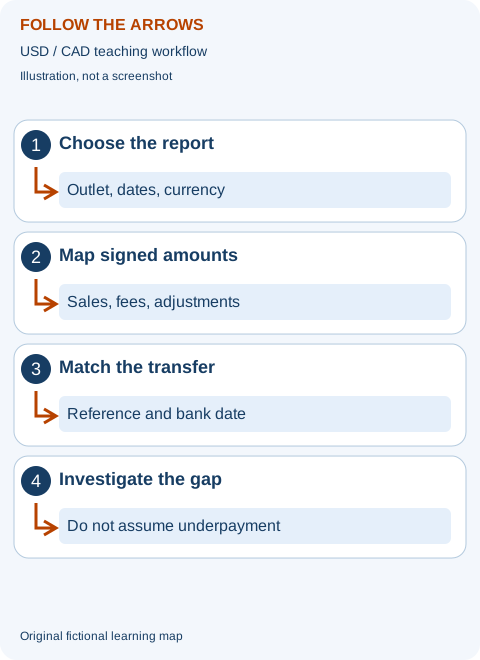
Sales tell you what happened in your restaurant's orders. A payout shows the transfer after recorded charges and credits. The bank confirms cash received. Reconcile the same store, currency and payout reference before calling a difference missing money.
Available here: report-reading guidance and a manual USD/CAD calculator. Not currently available: a DoorDash data extractor, account connection or automatic DoorDash file parser. The existing extension supports Zomato and Swiggy only.
Choose a section in this guide
What is the DoorDash Merchant Portal for?
The Merchant Portal is the business side of DoorDash, not the customer ordering app or a Dasher earnings screen. This guide is written for restaurant owners, managers and bookkeepers who need a repeatable way to understand delivery sales and bank receipts. Use your own authorised account; never log in through an unofficial form promising to recover a payout.
Start by separating three questions. Did the order take place? Which charges and credits were assigned to it? Which transfer contains the resulting amount? A completed order does not, by itself, identify the bank credit. Likewise, a bank deposit does not explain every underlying fee. Keep operational evidence, financial evidence and cash evidence alongside each other rather than forcing one report to answer everything.
Picture an owner with two locations: one uses an account for the original shop, while the second location has a different payout arrangement. A combined sales download compared with only the first shop's bank deposit creates a difference even when both locations were paid correctly. Write the location and payout reference on your working sheet before entering amounts. This simple habit often matters more than a complicated spreadsheet.
New restaurant owners: prepare the first week before taking orders
DoorDash's official US setup guide covers the business account, order-receiving method, store details, menu, pricing plan and banking setup. Prepare the information required in your country's application and submit sensitive banking or identity details only through the official service. Requirements and timing vary; our website does not onboard restaurants or verify their documents.
Before going live, run a practical readiness review with your team. Confirm the displayed name, pickup address, menu prices, modifier choices, operating hours and sold-out items. Check that someone is responsible for accepting orders and that the chosen tablet or POS workflow reaches the kitchen. Assign a clear handoff area so a packed order is matched to the correct pickup. These are operational checks, not a claim that a particular feature is available in every merchant account.
Choose a sample dish and trace it through the workflow on paper. If a sandwich has two bread options and an optional side, does the kitchen ticket make the selection unambiguous? Does its packaging cost appear in your cost model? If the item is unavailable at dinner, who changes its availability? A new store can have an attractive listing but lose money through confusing choices, slow handoff or unrecorded packaging costs.
Record the agreement and plan that your business actually accepted. Do not use an internet article's fee percentage as your contract. Keep the onboarding check separate from the accounting review: being able to receive orders does not prove your banking information, report permissions or tax treatment are correct. Resolve any outstanding official setup tasks before relying on a first-payout forecast.
How to download DoorDash merchant financial reports
The current US financial-report instructions describe this route. Labels can change by market and account permissions:
- Sign in to the official Merchant Portal with your own authorised user.
- Open Reports, choose Create report, and select a financial report.
- Choose a one-time report or a recurring schedule. Select the store and the relevant payout or date scope.
- Create the report and download it when it is ready.
Save the original before filtering or editing it. Use a filename that identifies platform, location, currency, report type and covered period. A name such as DD-store-A-USD-payout-example.csv is a naming illustration, not a file generated by our tool. Note whether the report was grouped by transaction date or payout date. Two downloads with identical visible date labels may still answer different questions.
If a requested period misses late-night transactions, inspect the portal's time-zone and date-boundary guidance. Downloading a wider interval can help find the records, but then filter back to the documented scope. Do not count the additional days as extra sales merely because they appeared in the diagnostic download. For several stores, keep the selected store list with the exported report.
For a single transfer, the Canadian payout guide describes Financials → Payouts; open a payout to see its included transactions. Financials → Transactions and Statements provide different views. A monthly transaction statement is not necessarily the sum of bank payouts dated in that month.
Read sales, commission, marketing and amendments without double-counting
DoorDash's payout documentation groups sales, commission and fees, marketing spend and amendments. It also identifies payout IDs, dates and status. Use the definitions attached to your own report. An amendment may increase or reduce a payout; taxes and other charges may already be inside a grouped total. Do not add both the summary and its component columns.
Scope and reference
Identify the store, currency, date basis and payout ID. These decide which rows can be compared with one bank movement.
Charges and credits
Keep the sign of each adjustment. A reversal of an earlier charge is not a second sale, and a deduction must not be subtracted twice.
Cash and profit
A net transfer can include categories that are not restaurant revenue. Food, staffing and rent still need a separate profitability review.
For your working copy, give every amount one role: a report component, a subtotal, a transfer, or supporting evidence. Only report components belong in the payout arithmetic. Subtotals are checks on the components; transfers are matched to the bank. If you cannot tell which role a column has, stop and read its definition rather than guessing from the column's position.
DoorDash payout reconciliation example: USD 12,000 becomes USD 9,060
This entirely fictional exercise uses USD 12,000 of report sales, USD 2,400 in combined fees, USD 500 in marketing, a USD 80 credit and a USD 120 charge. These amounts are invented—not a DoorDash statement, advertised price, typical commission rate or real restaurant result. They are grouped on one consistent payout basis; do not reuse them as tax-exclusive menu revenue.
The calculation is 12,000 − 2,400 − 500 + 80 − 120 = USD 9,060. If the matching bank credit is USD 8,760, the unexplained difference is USD 300. The USD 3,240 distance from sales to bank cash is not all missing money: most of it is explained by the selected charges and credit. The remaining difference still needs investigation.
How a new user should use this calculator
- Try the fictional inputs first and select Calculate. Read the expected payout and the difference to the bank.
- Choose USD or CAD to label the amounts. This does not convert currencies.
- Replace the inputs with totals from one consistent report scope. Enter charges as positive deduction magnitudes and credits as positive additions; enter a bank debit as negative if applicable.
- Change only one input, calculate again, and explain why the result changed. A changed input clears the previous answer so it is not mistaken for a current result.
For example, reduce marketing from 500 to 400 while leaving the other invented inputs unchanged. Expected payout increases by 100 to USD 9,160, and the difference from the same bank amount becomes USD 400. That is arithmetic sensitivity, not evidence that the restaurant actually saved 100 or was underpaid 400. You need a revised report or other evidence before changing the real reconciliation.
The calculator does not read files, connect to DoorDash, contact a bank or submit a dispute. Inputs are processed in this page, with no upload or persistence. Save your documented reconciliation in your own secure records; reloading the page returns to the fictional example.
DoorDash payout missing or lower than expected? Check these first
Write the transaction date, payout date and bank posting date separately. A week crossing month-end can put orders in one accounting month and cash in the next. A transfer marked as initiated is not necessarily a posted bank credit. Use the actual portal status and your bank's evidence instead of a universal promise about a weekday or settlement delay.
- Reference: does the bank movement belong to the same payout ID and account?
- Scope: are both records for the same store and currency, with the same included transactions?
- Timing: is the deposit pending, split, reversed or shown in a later bank period?
- Adjustments: did the selected report include a credit, charge or amended statement that your working copy missed?
- Duplicates: was one download or bank receipt counted twice?
Use three statuses in your own control sheet: matched, explained timing difference, and unresolved. For a timing difference, record what evidence would close the item and when you will check again. For an unresolved item, write the exact amount and reference rather than a vague claim that the whole month's sales were not paid.
In the fictional USD 300 example, discovering a second related USD 300 bank credit would close the transfer match only after its reference and scope are verified. Finding an unrelated USD 300 deposit does not solve the issue. Matching by amount alone can hide a missed payment while falsely clearing another. Keep the original evidence with the explanation.
DoorDash error charges and disputes: use the official owner workflow
The official error-charge guide explains how to find error charges in Financials → Transactions and review an order's dispute option. Its current guidance requires the appropriate Admin or Store Manager access and generally limits portal disputes to deliveries within 14 days; older cases should go to DoorDash Support. Check the current rule in your own account.
A submitted dispute is not an approved refund. Track the decision and any later adjustment separately, then verify it in the relevant payout. Do not forecast a credit simply because you pressed Submit. Save the order reference, issue and your legitimate evidence; do not accuse a customer of fraud based only on a reconciliation difference.
DoorDash's help page states that third-party Merchant Portal access and third-party dispute submission are against its Portal terms. Keep the action in your own authorised official account. Food Data Extractor does not log in or file disputes for you. Any future export solution would require permitted access and compliance with the platform's terms; a future-tool announcement is not permission to bypass them.
A small weekly routine that helps a new owner
Set aside a short recurring review rather than waiting for a large month-end mismatch. Download the scoped reports, check new payouts against bank receipts, carry unresolved items forward, and assign the next action. Write who owns each open item. Keeping the same sheet structure each week makes a manager's handover much easier.
Then turn one finding into an operational question. Repeated missing-side adjustments may justify reviewing the bagging checklist. High promotion spend may justify comparing contribution after food and packaging. Neither finding proves that a campaign or staff member caused a loss: investigate the order trail and measure the change on a comparable period.
Use the prime-cost planner for food and labour totals, the 13-week cash-flow model for the timing of receipts and bills, and the channel comparison for dine-in versus delivery contribution. All are manual learning tools; none automatically imports DoorDash reports or determines your tax liability.
What to send to DoorDash merchant support
Use authenticated merchant support for payment or account-specific problems. Prepare the store, payout/order reference, period, expected amount, bank amount and checks completed. A clear fictional message would be: “For payout EXAMPLE-A in USD, the selected report totals 9,060, while the matched bank credit is 8,760. I checked the store, reference and date scope. Please help identify the remaining 300.” Do not send this invented reference as a real case.
Share only the evidence the authorised support channel needs, redacting unrelated customer and bank information. Do not post complete reports, account numbers, passwords or authentication cookies in a community discussion. If someone contacts you outside the official service asking for credentials to speed up a refund, do not proceed.
DoorDash restaurant-owner questions
Is this a DoorDash data extractor I can install?
No. DoorDash extraction is not currently available. The calculator is manual, and the current extension supports Zomato and Swiggy only. Owners can discuss future tool requirements, without giving us account access.
Why do monthly sales and monthly payouts differ?
They may use different dates and included transactions. Compare activity by transaction date separately from transfers by payout and bank posting date. Fees, credits and other report components also matter.
Can I use this guide in Canada?
Yes, the evidence workflow and CAD-labelled calculator can help. Use your Canadian reports and agreement; do not copy US tax classifications or another restaurant's rates.
Does a matching payout prove the restaurant made a profit?
No. A cash transfer match only answers the selected reconciliation question. Food, labour, packaging, occupancy and other operating costs require a separate analysis.
Quick check: can you explain the result?
Sales are 500, deductions are 100 and the bank pays 400. Is profit 400?
No. The selected payout matches, but food, labour and other business expenses still need a separate review. The exercise says nothing about tax classification or owner withdrawals. Matching cash is useful, but it is only one part of managing the restaurant.
A signed fee is minus 20. Should you subtract minus 20?
Not when adding already-signed report components. Add minus 20 to reduce the total. For this page's calculator, enter positive 20 in the deduction field. First decide which representation your sheet uses, then apply it consistently. Mixing the two changes a deduction into an addition.
Two rows have the same order number. Can you delete one?
Not without checking their record types, dates, amounts and references. A sale and a later refund can legitimately share an order number. Preserve originals, investigate on a working copy and document any confirmed duplicate removal.
A complete desk exercise: build a payout match from scratch
Imagine a small fictional US restaurant called Cedar Bowl. Its owner, Maya, wants to check a transfer without learning complicated accounting software. She opens a blank sheet and writes four headings: source record, amount, meaning and next action. The source record is not the customer's name. It is a business reference that lets an authorised person find the same evidence again. In this exercise all amounts are invented and all references are examples. No actual DoorDash fee, customer record or merchant result is being represented.
Maya begins with the final payout record, not a screenshot of the home dashboard. She records payout EXAMPLE-C, USD, store Cedar-A and the covered order dates. She also records the download date. The download date matters because an earlier copy may not contain a later correction. She keeps both copies rather than silently replacing history. If a later document changes the amount, she writes which version is now being used and why. A second person should be able to understand that decision without asking her to remember it.
Her original payout arithmetic is sales 4,800, fees 960, marketing 160, refund charges 90 and other credit 40. The expected cash is 4,800 minus 960 minus 160 minus 90 plus 40, which equals 3,630. The bank shows 3,630 with the appropriate reference. The transfer is matched. That does not tell Maya whether Cedar Bowl earned 3,630. She has only proved that the selected financial components explain the selected cash movement. Food, labour and premises costs have not been tested by this match.
For the separate operating review, suppose the same exercise uses net food-sales revenue of 4,800, food cost 1,450, packaging 180 and the same 960 fees, 160 marketing and 90 refund expense. Those definitions are assumptions for this exercise, not an interpretation of all real tax-inclusive report columns. Contribution is 1,960 before fixed expenses and before treating the 40 correction according to its actual accounting purpose. Maya asks the bookkeeper what the credit corrects. She does not automatically label every credit food-sales revenue. Separate sheets protect two different questions from being confused.
Make a date map when the week crosses month-end
A date map is a short timeline. Write when the order happened, when the payout was recorded and when the bank posted it. These dates may fall in different months. Consider an invented order made late on 30 April, included in a later payout and credited by the bank on 5 May. An April transaction review can include the order while an April bank review does not. Neither record is necessarily wrong. The business must choose which date answers the question and then keep that choice consistent.
Start with a single transfer that crosses the boundary. Highlight its earliest and latest included transactions on your working copy. Next highlight the bank posting date. Do not change the order date to make a monthly cash total look neat. If the business uses accrual accounts, sales and cash can appear at different times; your bookkeeper should apply the accounting policy. If you are preparing a cash forecast, the expected bank receipt date is relevant. One file cannot be assumed to answer both tasks with the same filter.
For a simple fictional month-end bridge, suppose 700 of April transfers remain in transit at the start of May, 9,000 of new transfers are initiated during May and 500 remains in transit at the end. Expected May bank receipts are 700 plus 9,000 minus 500, or 9,200, assuming no other cash movements. The opening and closing transit amounts need individual references. A single unexplained number called timing is not enough. This bridge is a teaching method, not a substitute for actual platform and bank evidence.
Check the timezone if late-night orders appear on a neighbouring day. Preserve the original timestamp and timezone if provided, and write any conversion beside it. A restaurant closing after midnight should not manually move transactions to yesterday merely to fit a shift report. Shift reviews and calendar reports can use different boundaries, but each needs a clear definition. Tell the manager what the boundary is before comparing two periods. The useful outcome is an explained bridge, not two superficially identical totals.
Duplicate rows: what you can remove and what you must investigate
A repeated order number is a warning to inspect, not automatic permission to delete. One order may have a sale, a refund and a later correction. Those are different records even if they share an order reference. Compare the record type, amount, sign, adjustment reference and date. Where the report supplies a unique transaction identifier, preserve it. If no unique identifier exists, keep a written explanation of the matching rule rather than claiming that a guessed rule is guaranteed.
In an invented example, order EXAMPLE-D has a sale of 30 on Monday and a refund charge of 6 on Wednesday. Deleting the Wednesday row because its order number repeats would overstate retained cash by 6. Another export contains exactly the Monday sale row again because two downloaded periods overlap. Counting both would overstate sales by 30. These problems have opposite effects. A repeated order ID alone cannot distinguish them. The working sheet must look at the whole financial record.
Work on a copy and keep rejected rows in a separate review tab with a reason. For example, write exact repeated sale record from overlapping download, with both source filenames. Do not erase the original exports. After removing a confirmed duplicate from the working copy, recompute the total and compare it with the scoped summary. If the total no longer agrees, pause. It may mean the supposed duplicate was actually a legitimate adjustment or the summary used a different scope.
Have a colleague independently check the first batch of duplicate decisions. They should not simply agree with the final number; ask them to trace two removed rows and two kept repeated references back to source evidence. This is a practical training exercise for a new manager. It teaches careful reading without requiring a complex database. Keep a small exception log so the next person does not repeat the same investigation every month.
Practise positive and negative amounts before using a spreadsheet
A sign says which direction an amount moves the selected total. Some exports present deductions as negative numbers; some show positive magnitudes under a deduction heading. These layouts need different formulas. Never decide that a minus sign looks untidy and remove it. A useful beginner test is to make one tiny example with known answers before adding hundreds of rows. Write the column's meaning in ordinary words, such as this reduces the transfer, beside the numerical sign.
Suppose an invented report contains sales 200, a signed fee of minus 40 and a signed correction of plus 5. Adding the signed components gives 165. If you instead subtract minus 40, you obtain 245, which reverses the charge. Conversely, if a report lists fee magnitude 40 under a deduction heading, subtracting that positive magnitude gives the correct 160 before the correction. The manual calculator on this page uses positive deduction magnitudes, not a raw signed-column import. Convert consciously and document the conversion.
Try a reversal exercise. A charge of 12 was applied last week and a correction of 12 is recorded this week. The correction increases this week's transfer, but it is not a new order. A rolling exception log links both records. If the original charge was already included in last week's accounts, ask your bookkeeper how the correction should be recognised. The teaching principle is simple: explain what the correction reverses before assigning it to a sales or expense category.
Rounding should also be deliberate. Add the source values at their provided precision before displaying a rounded result where possible. A very small difference can arise from rounding, but do not dismiss a large discrepancy as rounding without testing it. Record the tolerance your business uses and why. A tolerance is a review rule, not permission to ignore an actual missing payment. Investigate recurring small differences if they accumulate or consistently point in the same direction.
Read marketing charges once, then ask whether the promotion helped
Marketing appears in two separate conversations. The first is whether its recorded charge is included correctly in the payout arithmetic. The second is whether the campaign made commercial sense after food, packaging and other costs. Solve the arithmetic first. If a fee total already contains marketing, do not subtract the same marketing amount again. If the report separates it, include it once. DoorDash's published payout descriptions should be read with the actual field definitions because different summaries do not always describe every component identically.
For a fictional decision, a dish has net sales revenue of 22, food 7, packaging 1 and selected per-order channel costs 5. It contributes 9 before fixed costs. A merchant-funded discount of 3 reduces that contribution to 6, if the customer price and fee assumptions otherwise remain comparable. Twenty genuinely additional orders contribute 120 before any extra staffing or other campaign cost. They do not create 440 of profit. This is not a quoted DoorDash rate or a forecast of your results.
Now add the possibility that ten discounted orders would have happened without the campaign. Those ten lose 3 contribution each compared with the undiscounted case, while the twenty additional orders bring 120. The simplified change is 90 before other effects. Identifying genuinely additional demand is difficult; this example is not a method for proving causation from a dashboard. Compare reasonably similar days, note weather, holidays and menu changes, and describe uncertainty honestly.
Also ask whether the extra volume strains the kitchen. If it requires an additional paid shift, include that cost in the decision. If slower preparation creates refunds or disrupts dine-in service, examine those outcomes separately. Do not compare only order count. A small campaign can be worthwhile even without spectacular sales growth, and a busy campaign can be unattractive after costs. A sensible owner records a hypothesis, a budget and a review date before spending, rather than declaring success from gross sales alone.
Build an exception sheet that tells you what to do next
An exception is a record that does not yet fit the expected explanation. Your sheet can be very small: reference, location, amount, reason, evidence checked, responsible person and next review date. Use separate columns for confirmed facts and questions. For example, bank credited 850 is a fact supported by a bank record; platform owes 100 is still a question until the scoped payout calculation and references support it. Clear language prevents assumptions from hardening into accusations.
Use practical categories: wrong scope, waiting for bank posting, missing document, adjustment needing explanation and genuine unresolved transfer. Avoid a long list of codes that nobody understands. The category should help the next action. Wrong scope means obtain the correct store or period. Missing document means request the relevant report. An unexplained adjustment means look up its reference or contact authenticated support. A category without an action is merely a label.
Suppose an invented expected transfer is 950 and the bank shows 850. On Tuesday the manager logs a 100 unresolved difference. On Wednesday they find an additional related 100 receipt. They record its bank reference, verify that it belongs to the same payout and close the item. They do not delete the Tuesday investigation. Keeping its history shows why the conclusion changed and helps distinguish a normal split from a recurring issue. If the second receipt were unrelated, the exception would remain open.
Review old items first each week. A fresh spreadsheet that forgets last week's exceptions can make a problem disappear from attention without solving it. Give each item an owner and a practical deadline for the next check. If a manager is away, transfer responsibility explicitly. Closing an item should require an explanation and supporting record, not merely a zero typed into the difference cell. The result is a control that a small restaurant can maintain without an elaborate system.
How to demonstrate a problem without exposing a customer's details
A useful screenshot shows the business reference and relevant amounts, not every detail of the order. Before sharing it outside the authorised support process, remove customer names, phone numbers, addresses and unrelated banking information. Use a duplicate image for redaction so the original remains securely available if the authorised channel legitimately requires it. Make sure the redaction actually removes information rather than placing a transparent highlight over it. Do not publish full exports in a public community discussion.
A spreadsheet can also contain hidden tabs, comments or formulas with private information. For public discussion, create a new fictional example with the same arithmetic structure rather than sending the real workbook. If you need to ask why 200 minus 40 plus 5 is not 245, you do not need a customer's order details to explain the sign mistake. Distinguish teaching examples from evidence submitted to official support. They have different purposes and should not share the same file.
Choose the minimum necessary access for staff. A person packing food may need an order ticket, not financial exports or bank settings. A bookkeeper may need financial records, not a reusable shared password. Review access when people leave or roles change, using the official controls available to your account. Do not use public chat to exchange session cookies, authentication codes or account recovery information. We do not require these to discuss a future exporter idea.
If a stranger promises instant payout recovery, do not follow their login link or grant remote access to your merchant session. Navigate to the official service yourself and use its support options. A reconciliation worksheet does not authorise anyone to change bank details. Separate financial investigation from account recovery. If you suspect an account compromise, use the platform's official security and support process rather than continuing to share exports with the person who contacted you.
Train another manager with a reproducible handover
A good handover is a short demonstration, not a folder of unexplained screenshots. Give the new manager one fictional payout, one bank entry and the relevant field meanings. Ask them to write the store, currency and date basis first. Then ask them to reproduce the expected transfer. Only after the arithmetic is right should they decide whether the bank matches. This order prevents the habit of adjusting inputs until the difference looks acceptable.
Make the trainee explain why sales are not profit and why a repeated order reference may be legitimate. Ask what they would do if a required field were blank. The safe answer is to flag missing evidence, not silently enter zero. Ask how they would handle a negative fee column in the positive-magnitude calculator. They should describe the conversion. These questions test understanding better than asking whether the instructions felt clear.
Finish with a small written method: where approved source files are kept, how they are named, who may download them, which report basis is used and who reviews open exceptions. Include the official help links and the date they were checked. Do not save passwords in the method. Screens can change, so explain the purpose of the report as well as its current name. A person who understands the purpose can ask the right support question when a button moves.
Once the trainee can reproduce the fictional result, let them prepare a real working copy under authorised supervision. The experienced reviewer checks scope and exceptions before relying on it. Keep responsibility clear; a teaching guide is not a professional sign-off on business accounts. The practical goal is a repeatable, documented transfer check that supports the wider food, labour and cash review—not a complicated dashboard that only its original creator can understand.
Three deeper checks before calling a payout review complete
Check a cancelled order from both sides
Cancelled does not automatically mean zero financial effect. An order may have operational history and an associated payment or correction according to its circumstances and agreement. For an exercise, suppose a cancelled order originally appears with a twenty dollar charge and later receives a twenty dollar reversal. Trace both entries rather than assigning a value from the status word alone. If the report shows no payment, do not manufacture one because you remember preparing the meal. The question for support is what the documented order circumstances mean under your agreement, not whether a generic internet formula suggests compensation.
Write the cancellation time, the status shown and the financial records supplied, without guessing why a customer cancelled. If a report and an order screen conflict, preserve both source references and ask the official channel to explain. A staff member's recollection may help locate a ticket, but it is not proof of a bank movement. Do not combine a hypothetical compensation amount with already-recorded sales. Wait for the actual financial evidence before including an adjustment in a final reconciliation.
Check what a store transfer really contains
Two restaurants may trade under one brand but use different business entities or bank arrangements. A report containing several stores should not automatically be divided equally between them. Use location identifiers and documented transaction allocation. If the transfer itself is combined, record its included store subtotals and reconcile the sum to the single bank movement. If the transfer is separate, match each reference separately. This avoids falsely marking the first location overpaid and the second underpaid simply because their deposits were combined.
For a fictional example, one location contributes a scoped transfer subtotal of nineteen hundred dollars and another contributes fourteen hundred dollars. The combined transfer should be thirty-three hundred dollars before any separately documented group-level adjustment. If the bank shows thirty-two hundred dollars, identify whether a one hundred dollar adjustment belongs to the combined transfer rather than allocating it casually to a store. An allocation decision for management accounts should be written separately from the cash match. It should not rewrite what the platform actually paid.
Check a revised report without losing the original story
A revised report can legitimately change a previous conclusion. Suppose your first working copy matched, but a later document adds a refund linked to an earlier order. Record the new document's date, reference and scope. Decide whether it changes the old payout or is carried into a later payout using the actual report evidence. Do not backdate a bank receipt or silently edit the original sheet to make it look as though the adjustment was always known. Clear revision notes make later reviews far easier.
Use a simple version note: first review prepared, source report used, later correction received, updated review prepared and reviewer. Keep the amounts and reason beside each change. A version number by itself does not explain the change. In a small business, one plain sentence can be enough if it points to the supporting record. This habit is especially useful when the owner, bookkeeper and shift manager review files on different days.
Decide what happens after the numbers match
The best outcome is not merely a green cell. It is a useful next decision. A matched payout with repeated missing-side charges may suggest a packing review. A clean payout but shrinking contribution may suggest recipe costing. A profitable period with late cash receipts may require a cash forecast. Keep each follow-up in its own lane. Do not treat a staffing change as a remedy for a bank reference mismatch, or a support ticket as a substitute for pricing analysis.
Choose one small improvement, write what evidence will show whether it helped and review a comparable period. For a packing change, track the relevant errors and order volumes rather than only the total refund amount. A quiet week can produce fewer refunds without the change having improved accuracy. For a cash planning change, track whether bills and expected receipts were forecast correctly. Useful controls help the restaurant act on the right question, not simply produce more paperwork.
Before filing the review, ask whether another authorised person could repeat it from the saved source records. They should see the selected store and currency, the date basis, the signed components, the bank reference and any unresolved items. If an important explanation exists only in a private message or your memory, move a privacy-safe version into the working notes. This final step turns a one-off calculation into a reliable routine while keeping personal customer information out of the teaching record.
Official sources and review scope
Checked 11 October 2026. These primary sources support the described portal workflows, not our invented examples or an earnings claim. Screens and terms can change by market and permission. No fee percentage, payout arrival date or dispute outcome is guaranteed here.
- DoorDash US: restaurant setup
- DoorDash US: financial report creation
- DoorDash Canada: payouts, statements and terminology
- DoorDash: error charges and disputes
Read our editorial and corrections policy. This is independent education, not an audited accounting opinion, legal advice, official support or a platform partnership.