
RESTAURANT OWNER GUIDE · US & CANADA
Uber Eats Manager: Payment Reports & Restaurant Payouts
A beginner-friendly guide to setting up your reporting routine, downloading Uber Eats payment details, understanding fees and checking restaurant payouts against the bank.
The short answer
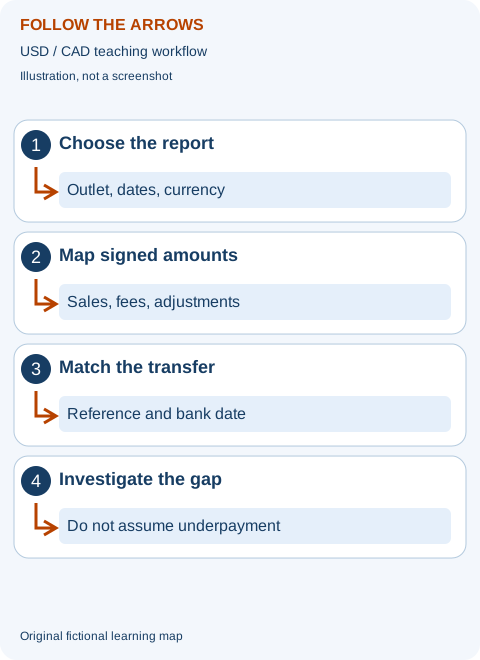
Use Payment Details to investigate transactions and adjustments, Payment Summary to understand amounts paid, and your bank record to confirm cash received. Match the same location, currency and payment reference before deciding a difference is missing money.
Available here: independent guidance and a manual USD/CAD calculator. Not currently available: an Uber Eats data extractor, account connection or automatic Uber report parser. The existing extension supports Zomato and Swiggy only.
Choose a section in this guide
What does Uber Eats Manager do for a restaurant?
This guide is for restaurant owners, managers and bookkeepers, not delivery couriers. Uber Eats Manager is the business-management environment; the order-receiving workflow is a related but different task from reviewing reports. The customer app is not the source for your merchant settlement evidence. Start with your own authorised account and the official help pages below.
Choose the report by the question you need answered. Uber's Reports Tab documentation distinguishes Payment Details, Payment Summary and operational reports such as order history or downtime. An operational download can help investigate an order, but it should not be assumed to contain every payout adjustment. A cash summary does not replace the transaction trail.
What happened?
Use operational evidence to review orders and availability. Keep an order reference when following an issue.
What was recorded?
Use payment detail to examine the included financial components and adjustments.
What arrived?
Compare the payment reference and summary with the matching bank movement.
For example, a manager may download two stores' sales and then compare them with a deposit for only one store. The spreadsheet can be accurate and still be the wrong comparison. Write the selected locations, currency, report type and date basis at the top of your working sheet before applying a formula. That note prevents a large number of avoidable mismatches.
New to Uber Eats? Prepare the account, menu and order workflow
The official restaurant setup guidance covers restaurant information, menu, banking and required business details. Documents depend on your location and business. Submit identity, banking and tax information only through the authorised service. Our website cannot approve your restaurant, confirm your tax treatment or promise an activation date.
Before accepting orders, confirm who monitors the order-receiving device, who updates sold-out items and who checks the handoff. Review item names, prices, opening hours and modifier choices. A vague modifier such as “extra” can confuse a new kitchen team: make sure the actual menu and ticket describe what the customer selected. Record packaging cost in your own recipe model rather than assuming the platform fee covers it.
Uber's Menu Maker instructions distinguish direct menu editing from POS-integrated menus. If your menu is integrated with a POS, its instructions direct you to edit in the POS rather than Menu Maker. Establish the source of truth before changing a price in several places. Otherwise a later synchronisation may replace the value you thought you corrected.
Keep the agreement your business accepted and review the categories shown on your actual report. Another restaurant's advertised commission is not your contract. Store setup, order handling, reporting access and banking readiness are separate checks. Getting the first order does not prove that all four are correct. Assign an owner to each outstanding setup task and follow its status in the official service.
How to download Uber Eats Payment Details reports
The current comprehensive payment-report guide describes requesting reports in the desktop Uber Eats Manager. Labels and available permissions may differ. Follow this route in your own account:
- Open Reports and choose Request reports.
- Select the required locations, report type and date range. For financial investigation, choose the appropriate payment detail rather than an operational-only report.
- Request the report. Use Request History to check availability; download the CSV when ready.
- Keep an unchanged original and work on a copy. Record the report scope beside your analysis.
As checked on 11 October 2026, the comprehensive guide lists a maximum span of 31 days for Payment Details and 15 days for item-level reports. These are report-request limits, not a promise about how long payment takes or how much historical data every account has. If you need a longer period, request permitted intervals and verify their boundaries before combining them. Check current help when the interface imposes a different limit.
Uber also documents a Payments → Pay Period → Download CSV route for pay statements. The report and date selected determine whether you are looking at detail or a pay summary. A weekly period label is not automatically the date the bank posted a transfer. Keep those dates separate.
Name the saved copy by platform, restaurant, currency, report and period. Do not send a private export to an unknown converter or execute spreadsheet formulas embedded in text fields. When overlapping exports contain the same references, investigate whether they are duplicate rows or distinct adjustments before removing anything. Deleting every repeated order ID can erase legitimate financial history.
US and Canadian payment fields: read the glossary for your market
The comprehensive report documentation provides separate US and Canadian field descriptions. Treat that distinction as important. Taxes, tips, fees, promotions, other payments and withholdings can have different meanings and signs. Do not take a US tax column and assume it has the same accounting treatment in Canada, or apply an Indian GST example to either market.
Build a small field dictionary with the exact column name, unit, sign, date basis and inclusion in a subtotal. Mark each amount as a component, a subtotal or a transfer. Components belong in the arithmetic; subtotals check the arithmetic; transfers match the bank. Adding detail rows and the summary as separate income counts the same money twice.
If a refund is already inside net sales, do not subtract it again. If an adjustment is signed, preserve that sign in your working model. A positive correction may increase cash without being a new sale. A tip or tax movement may pass through a payment without belonging in the food-sales denominator. Classification should follow your report definitions and accounting policy, not the order of columns in a spreadsheet.
Blank is not automatically zero. If the report does not provide a category, write “not provided” and investigate. A zero is a known value; missing evidence is uncertainty. The calculator below is a simplified teaching model, not a substitute for that dictionary. Add any real components outside its scope to your own reconciliation before relying on a transfer match.
Uber Eats payout example: USD 8,000 becomes USD 6,180
This fictional example has USD 8,000 of report sales, USD 1,600 of fees, USD 200 of merchant-funded promotion charges, USD 50 of refunds and a USD 30 credit. These are invented amounts—not an Uber statement, typical fee, advertised price or real business result. Other tax and cash components are intentionally outside this simplified case.
The expected transfer is 8,000 − 1,600 − 200 + 30 − 50 = USD 6,180. Against a scoped bank receipt of USD 6,000, the unexplained difference is USD 180. The full distance between sales and cash is not missing money, because the selected deductions and credit explain much of it. The remaining 180 still needs evidence.
How to use the free manual tool
- Calculate the fictional inputs first. Read both results: expected payout and difference to the bank.
- Choose USD or CAD as a label. Every input must be in that one currency; this is not a foreign-exchange converter.
- Replace inputs only after identifying one consistent report scope. Enter charges as positive deduction amounts and credits as positive additions. A bank debit can be negative.
- Change one input and calculate again. Editing an input clears the old result so you cannot mistake stale arithmetic for the current answer.
Try reducing the fictional fees from 1,600 to 1,500. Expected payout increases by 100 to USD 6,280; the difference from the unchanged 6,000 bank receipt becomes 280. This does not prove fees were reduced or that Uber owes the business 280. It shows what the arithmetic would do if the documented component changed. Only revised source evidence justifies changing a real reconciliation.
Amounts are processed locally in the page. No report is uploaded, no account is connected and no inputs are saved between visits. This tool does not read Uber CSV files or submit support cases. Record your actual reconciliation in your own secure records, with source references and any components omitted by the simplified model.
Uber Eats payout not matching the bank: a safe checking order
Start with payment reference, location, currency and date basis. Check whether one transfer covers activity on both sides of month-end. Distinguish an order date from a pay period and a bank posting date. Timing can explain a difference without proving an error, but “timing” should not become an indefinite label for an item no one investigates.
- Verify the payment reference against the summary and bank record, not the amount alone.
- Check whether a deposit is split, still pending, reversed or posted in another bank period.
- Review signed adjustments and replacement versions of the report.
- Check that combined-store downloads were not matched to a single-store deposit.
- Carry unresolved differences forward with a named owner and next check.
The Canadian report glossary includes payout statuses such as Paid, Pending and Rejected By Bank. Use the actual status in your market and contact authenticated support about a rejected or unexplained transfer. Do not promise yourself a universal arrival weekday based on another country or an older tutorial. Changes to banking details should happen only through the official account workflow.
In the fictional case, a second related 180 bank credit could close the match after its reference and scope are confirmed. An unrelated receipt for the same amount would not. Use three working statuses: matched, explained timing difference and unresolved. For the timing status, write what future evidence should close it and when to check. For unresolved items, state the exact amount and source reference.
A practical first-month routine for a new restaurant owner
In week one, prove one small payout match from download to bank. In week two, repeat the same scope and record any exceptions. In week three, review recurring operational issues beside their financial evidence. In week four, document the method so another manager can reproduce it. This is a suggested routine, not a platform requirement or a promise of higher rankings in the delivery app.
Uber's storefront learning resources cover menu presentation, hours, preparation and availability. Use accurate descriptions and keep the order workflow manageable. If the kitchen is overloaded, use the authorised availability controls supported by your setup rather than accepting orders you cannot fulfil. Match improvements to evidence rather than assuming a prettier listing alone makes a campaign profitable.
Consider an invented bowl priced at 24 with food costing 7, packaging 1 and selected variable channel costs 6. On that simplified basis it contributes 10 before fixed costs. Adding a merchant-funded discount of 3 reduces contribution to 7 if nothing else changes. Thirty extra discounted orders contribute 210, not 720 of profit. The case omits other costs and does not represent any platform's current fees. Evaluate realistic incremental demand and kitchen capacity before treating an offer as successful.
For further practice, use our channel comparison, prime-cost planner and cash-flow forecast. They answer different questions from transfer matching. A payout can reconcile correctly while menu contribution or cash planning still needs attention. None of these manual tools automatically imports Uber data or determines your taxes.
How to ask Uber merchant support for useful help
Use the authenticated merchant support channel for an account-specific issue. Prepare the location, report type, period, payment reference, expected amount, bank amount and checks already completed. An invented support note could say: “Payment EXAMPLE-B in USD shows 6,180 on the scoped reconciliation and 6,000 in the matched bank receipt. I checked the location, reference and dates. Please help identify the remaining 180.” Replace this with actual verified evidence; do not submit the invented reference.
Provide only evidence needed by the authorised support process and redact unrelated personal information. Do not post customer exports, bank account numbers, passwords or session cookies in a forum. Our support contact can discuss a future exporter requirement, but cannot change Uber payments, recover your account or act as official Uber support. A future integration would require permitted access and compliance with platform terms.
Uber Eats restaurant-owner questions
Is Uber Eats extraction available in this extension?
No. Uber Eats extraction is not currently available. The current extension supports Zomato and Swiggy only. This page provides manual guidance and a calculator; owners can discuss future requirements without sharing account access.
Can I use the calculator on an iPhone or Android phone?
Yes, the manual inputs and results work in the mobile page. The cited comprehensive report-download workflow is for desktop Uber Eats Manager; mobile availability and permissions depend on the official service.
Why are sales different from the payout?
Sales and cash transfers answer different questions. Charges, credits, tax or other cash components and date boundaries may matter. Compare the same payment scope before diagnosing an error.
Does CAD convert the example from USD?
No. It changes the amount label only. Use inputs already expressed in one currency and the Canadian glossary for your own report.
Your first report: a small exercise before a full month
A new owner does not need to begin with thousands of rows. Choose one completed period for one location and one currency. Write what you want to know before requesting anything: which orders and adjustments explain this payment? That question points toward payment evidence. Which item sold most often is a different question and may need item-level data. Why orders were missed may need an operational report. Starting with the question is much easier than opening every available download and hoping a useful answer appears.
In this original fictional exercise, a Canadian café called Pine Table reviews one CAD payment. Its owner writes the location code, report type, start date, end date, payment reference and download date on a cover sheet. She saves an unchanged original in a private business folder and makes a working copy. She does not begin by deleting columns that look unfamiliar. First she reads the meaning of each financial category and marks whether it is a component, a subtotal or supporting information.
Suppose the exercise has report sales of 2,600, selected fees of 520, restaurant-funded offers of 80, refund deductions of 35 and a correction credit of 15. The simplified expected transfer is 1,980. A matching bank movement of 1,980 closes that cash question only when its reference and scope also match. It does not mean Pine Table earned 1,980 of profit. The exercise deliberately leaves food, labour, rent and tax classification for a separate review. Its invented fees are not published Uber prices or a typical Canadian agreement.
Ask another authorised person to reproduce the calculation using the source record. If they cannot identify which report or period you used, improve the cover sheet. If they obtain a different result, compare categories and signs before assuming the platform made a mistake. The first successful small review becomes the pattern for a larger month. Learning the method on a limited scope is usually less confusing than building a large spreadsheet while still deciding what its columns mean.
Which report answers which everyday restaurant question?
Think of reports as tools with different jobs. A payment detail report helps explain the financial record. A payment summary helps identify payments. Order history helps investigate what happened operationally. Downtime helps examine availability. Item-level information helps review menu performance. Those distinctions are supported by Uber's report-category guidance, but the exact available reports depend on the account. You do not need every report each week; choose the evidence that answers a particular question.
For an invented missing-bag complaint, the manager may need the order record, the kitchen ticket and any legitimate fulfilment evidence. A payment summary alone cannot explain whether the bag contained a side dish. For a transfer difference, a photograph of a packed meal cannot prove how a fee was calculated. Keep these evidence types linked by the relevant business reference, rather than expecting one document to replace another. The correct report shortens the investigation and reduces unnecessary sharing of private information.
For a slow Tuesday evening, begin with the sales and order pattern for a comparable period, then consider whether the store was available and whether preparation capacity changed. A smaller order count could reflect fewer customer orders, closed hours or a recording boundary. It does not automatically prove that an item description or campaign failed. Write the observations first and the possible explanations second. That separation lets you investigate without presenting guesses as facts.
A useful report-request note contains the question, locations, currency, date basis, requested type and whether you need detail or a summary. If a request fails, check permissions and the permitted period before repeatedly submitting it. Keep the request status and ask official merchant support when the necessary report is not available. Do not use a courier earnings report as a restaurant payout substitute. The supplier, account type and money being described are different.
Single-store and multi-store reviews without mixing the money
A business with two locations can have combined downloads, separate transfers or different arrangements. A combined sales total is not automatically comparable with one location's bank receipt. Start by listing the selected location identifiers. Trade names are helpful to humans, but identifiers can distinguish similarly named locations. Keep one currency in each calculation. Selecting CAD in the teaching calculator labels numbers; it does not convert USD amounts or apply an exchange rate.
Consider a fictional group with CAD transfer subtotals of 1,980 for Pine Table North and 1,420 for Pine Table South. If the documented payment combines them, the subtotal is 3,400 before any separately documented group-level items. If the bank shows 3,400 with the correct reference, the group transfer may match. For management reporting, each location still needs its own activity and costs. A combined payment does not make the two restaurants equally profitable, and dividing the cash in half would hide their different performance.
If one location is newly opened, keep its opening period separate when comparing it with an established location. Days open, menu mix and operating capacity may differ. Do not call a store worse merely because it has fewer total orders in fewer trading days. A fairer description might be orders per open day, with the relevant context. Even that measure does not establish profit without food, labour and other costs. Choose the comparison that suits the decision you actually need to make.
Document who may access each location's reports. When a manager changes stores or leaves, update permissions through the official service. Sharing one password between several people makes responsibility unclear and can expose banking controls unnecessarily. A reporting routine should have an authorised owner, a reviewer and a safe place for source files. The guide does not require access to your merchant account, and a future exporter enquiry should never include passwords or reusable session details.
Combine longer periods without duplicating orders or losing corrections
When a report request has a permitted date-span limit, a longer review may need several files. Write the included boundaries before combining them. Make sure adjacent requests do not accidentally overlap or leave a gap. A late correction can have the same order reference as an older sale but a different financial date. Repeated order numbers therefore need inspection, not automatic deletion. Preserve the original files and do any cleaning in a working copy.
Imagine an invented January review built from two payment-detail exports. The first ends at the close of 15 January and the second begins on 16 January according to the report's documented date basis. A separate operational report may group shifts differently. Do not join the files by their visible month label alone. Confirm what the timestamp represents and whether timezone conversion is involved. A business that trades past midnight should write its shift-review convention separately from calendar accounting dates.
For a duplicate exercise, order EXAMPLE-P has a sale record of 28, a later refund deduction of 4 and an identical copy of the sale in an overlapping export. Keeping the sale and refund gives 24 before other components. Keeping both sale copies gives 52 before other components, while deleting all repeated order references can erase the legitimate refund. Record type, amount, sign, date and unique references help distinguish the cases. If the source lacks enough information, flag the uncertainty rather than claiming perfect deduplication.
After combining the working copies, total each original interval independently and compare it with the combined result. Explain any removed duplicate rows in a review tab with the source filenames. This small check catches many accidental omissions. A revised report should receive a new version note, not silently overwrite the evidence used previously. The aim is a traceable record that a bookkeeper can understand, not merely a smaller file.
Use item-level information to understand a menu, not just admire sales
An item report can show which dishes were ordered, but order count alone is not a menu decision. Add your own recipe cost, packaging and relevant variable channel costs on a consistent basis. Keep those cost estimates dated. If a supplier price changes, update the recipe rather than assuming last month's cost still applies. Separate a base item from paid modifiers so an expensive extra is not mistaken for free revenue. The report tells you what was recorded; your cost sheet tells you what preparing it used.
Take a fictional café selling a bowl with net sales revenue of 18. Its ingredients cost 5, packaging costs 1 and selected variable channel charges cost 4. Contribution is 8 before fixed expenses. A second dish sells for 25 with ingredients 9, packaging 1 and selected variable charges 5, leaving 10. The first has a higher contribution percentage, but the second contributes more money per sale. These original examples use made-up costs, not Uber's fee rates or an industry target.
Now compare preparation capacity. If the second dish occupies a constrained station for twice as long, contribution per order is not the only useful measure. Write the actual bottleneck and observe representative preparation times. Do not pretend that a simple spreadsheet proves the optimal menu. It helps frame a decision: which items use scarce kitchen time well, which cause delays and which customers value? Review quality and safety before any change. A faster process that compromises correct preparation is not a successful improvement.
Use item information to ask a small testable question. Perhaps a clear modifier label reduces avoidable ticket confusion. Record the change date, the affected item and the type of error you will review. Compare similar trading periods and note other changes. Do not describe every later sales increase as caused by the edit. The value of a beginner worksheet is that it separates an observation, a hypothesis and a cost-based decision in language the whole team can understand.
A discount exercise: extra orders are not automatically extra profit
A promotion can increase activity while reducing contribution per existing order. Begin with the undiscounted case, then write who funds the discount and whether the report already nets it into sales. If it is already deducted from the revenue figure, do not subtract it a second time. If it is shown separately, include it once. Never infer funding from a customer-facing badge alone. Check the actual campaign terms and financial definitions used by your business.
Suppose a fictional Canadian bowl contributes CAD 8 before fixed costs. A restaurant-funded CAD 2 offer reduces contribution to CAD 6 under the exercise's unchanged fee assumptions. Forty additional orders would bring CAD 240 contribution before extra staffing, wasted food and other effects. If twenty customers would have bought anyway, those existing orders lose CAD 40 compared with the no-offer case. The simplified net change is CAD 200 before additional costs. This is an illustration, not a forecast or proof of which orders were additional.
If the promotion needs an extra CAD 120 shift and creates CAD 30 additional packaging or wastage not already included, the simplified change falls to CAD 50. A dashboard can show large sales while the final operating benefit is modest. Do not add the packaging twice if it was already in the per-order cost. Write every assumption and keep periods aligned. A weekly campaign decision cannot subtract a whole month's overhead without explaining the allocation.
Before running a real campaign, set a budget, record baseline periods and decide what evidence would count as useful. Include service quality and kitchen capacity, not only order volume. Stop claiming that higher sales guarantee success. It is reasonable to say the results are encouraging but uncertain, or that the campaign brought volume without enough contribution. Plain, careful conclusions are more useful to a new owner than a dramatic growth percentage that the evidence cannot support.
Explain the gap between recorded payments and this month's bank cash
Cash timing can be confusing even when every transfer is correct. Write payment initiation and bank posting dates separately. A transfer initiated at month-end may arrive in the following month. A rejected or reversed transfer needs a different explanation from normal timing. Use the actual status and reference from your market's documentation; the US and Canadian glossaries do not establish every field used in other countries.
For a fictional bridge, opening transfers in transit are CAD 400. New payments initiated during the month total CAD 7,500. Closing transfers still in transit total CAD 600. If there are no other relevant movements, expected bank receipts are CAD 7,300: opening transit plus initiated payments minus closing transit. Each transit amount must have supporting references. This is original arithmetic for teaching, not a claim about Uber's schedule or a promise that a pending payment will clear on a particular date.
If the bank instead shows CAD 7,200, the remaining CAD 100 needs investigation. Do not call the entire CAD 800 difference between sales and some payout subtotal missing money. First establish the correct comparison. Check a split receipt, an adjustment, the included stores and any duplicate entries. Matching by amount alone is weak evidence. Two unrelated deposits can share a value. A reference and documented scope provide a stronger trail.
When closing a timing item, write which later record resolved it. Do not simply replace pending with matched after enough days have passed. If it remains unresolved, assign a person and a next action. Normal timing is not a permanent excuse for ignoring an old difference. Use authenticated merchant support for unexplained payment status, and follow the official bank-change workflow if details need correction. A public guide cannot verify that your account or bank record is correct.
Make a support request that someone can investigate
A helpful message is narrow and evidence-based. Say which location, currency, report, period and payment reference you are discussing. State the expected amount and the matched bank amount. Describe the checks already done. Avoid sending a long accusation that combines missing orders, menu problems and several unrelated transfers. Separate cases are often easier for both the restaurant and official support to understand. Do not submit the invented references or values from this guide as real evidence.
Here is a fictional structure: for payment EXAMPLE-Q in CAD, our selected components total 1,980 and the bank shows 1,900. We checked the location, reference and report basis. Please explain the remaining 80 and identify any adjustment included outside this copy. The question asks for a specific explanation without assuming fraud or demanding a guessed amount. If you discover new evidence later, update the case rather than opening several contradictory messages.
Keep a case log containing the support reference, date raised, question, response and next action. A response that explains a component should be linked to the relevant report row. A response saying a correction will be reviewed is not the correction itself. Verify any eventual adjustment in a later financial record. Do not recognise a promised credit as cash received until the bank or relevant accounting evidence supports the particular conclusion being made.
Send private evidence only through the authorised channel and only when needed. Remove unrelated customer and banking details from general discussion. Beware of messages offering to solve payouts if you share an authentication code or session cookie. Navigate to the official service yourself rather than trusting a recovery link. Food Data Extractor can discuss possible future export needs, but it is not Uber support and cannot alter payments or make a dispute decision.
Interactive knowledge checks for a new owner
A payment report balances. Does that prove my menu is profitable?
No. Balancing proves only that the selected financial components explain the selected transfer. Add food, packaging, labour and other operating costs using consistent definitions. A business can have correctly paid orders that do not contribute enough to cover fixed expenses.
I chose CAD. Did the calculator convert my USD export?
No. The selector is a currency label, not an exchange-rate service. All input amounts must already use one currency. If you need a currency conversion for accounting, use the applicable policy and documented rate separately rather than mixing currencies in the model.
My report has a negative refund. Should I enter the minus sign here?
The deduction fields on this page expect positive magnitudes. Read the label and convert deliberately. A raw report that already uses signed components requires a different addition rule. Do not paste numbers into a simplified model without understanding how its formula treats them.
A menu edit increased this week's sales. Did the edit cause the increase?
Not necessarily. Trading hours, weather, holidays, promotions and ordinary variation can also change sales. Record the edit, compare reasonably similar periods and describe the result honestly. A before-and-after observation is useful, but it is not by itself proof of causation.
A practical handover and a one-month learning plan
In the first learning session, ask the trainee to identify Manager, the live order workflow and the menu source of truth. They should understand which task belongs where before editing anything. Use fictional records, not customer exports, for the demonstration. Next ask them to choose the report for three questions: what was sold, what was recorded financially and what arrived at the bank. This exercise builds a purpose-based habit that remains useful when interface labels change.
In the second session, have them reproduce the Pine Table transfer calculation. Ask them to explain each subtraction and why a credit is not automatically a new sale. Introduce one duplicate sale record and one legitimate refund sharing an order reference. They should inspect the difference rather than remove both. Then show a blank field. The safe response is to flag missing evidence, not type zero to make the spreadsheet finish. These are simple but important checks of understanding.
In the third session, compare a menu contribution example with a payout match. The trainee should explain why the two use different cost information. Have them change one fictional discount and predict its effect before calculating. Ask what would happen if an extra shift were required. This makes the tool a learning aid, not a machine that produces an unexplained percentage. Keep real wage and tax advice with the appropriate current professional or official source.
By the fourth session, write a short procedure with the source folder, naming convention, authorised report owner, review basis and unresolved-item process. Include official help links and the last check date. Do not include passwords. The reviewer should be able to reproduce a sample from saved evidence and understand any corrections. If they cannot, improve the notes before expanding the review to more locations or periods.
At month-end, choose one operational question from the evidence rather than changing everything. Perhaps modifier confusion needs attention, or repeated late handoffs deserve a kitchen review. State the next action, responsible person and measurement period. Check both service quality and financial effect. The guide helps a restaurant ask better questions, but it does not promise more orders, a particular margin or a successful account appeal. Accurate, repeatable decisions are a more useful starting point than a complicated dashboard.
For a final practice, write a plain-language explanation of the whole review in five sentences. Name the chosen report and period, explain the selected deductions and credits, identify the matching bank reference, state remaining uncertainty and describe the next action. If the explanation relies on vague phrases such as the app took too much or the numbers look wrong, return to the missing evidence. A clear five-sentence conclusion is a strong sign that the manager understands the worksheet rather than merely copying its totals.
Official sources and review scope
Checked 11 October 2026. These primary sources support the report categories, downloads and setup notes—not the invented examples, an earnings claim or a working integration. Screens, permissions and agreements can change. This article is independent education, not official support, audited accounting advice or a legal determination.
- Uber: Reports Tab and report categories
- Uber: comprehensive Payment Details downloads and market glossaries
- Uber: pay-period statements
- Uber: restaurant setup
- Uber: direct and POS-integrated menu editing
- Uber Eats Academy: storefront operations
See our editorial and corrections policy. Fees, payout timing, tax treatment and dispute outcomes must be checked in your own market and account.