Settlement analyser
Read the exporter ZIP locally, compare payout with net order value and spot payout cycles that need reconciliation.
- Net payout and retention
- Deduction pressure
- Mismatch warnings
 Food Data Extractor
Choose Zomato or Swiggy in the margin calculator, or analyse a supported settlement export locally. No spreadsheet formulas and no upload of restaurant reports to our server.
New here? Read the illustrated beginner walkthrough →Read the exporter ZIP locally, compare payout with net order value and spot payout cycles that need reconciliation.
Select the platform and estimate operating income after its entered commission, taxes, discounts, ads, refunds, food, packaging and fixed overhead.
Restaurant files are processed locally in the browser. Only subscription activation and plan validation contact our licensing service; uploaded report contents are not sent to it.
START HERE · NO REPORT REQUIRED
Use a tool to answer a specific question, not just to generate a number. The settlement analyser reads supported local payout files and explains their recorded adjustments. The margin calculator models the income left after costs you type. Neither tool operates your restaurant account, changes menu prices, applies for a licence, prepares a tax return or guarantees profit.
Use it when: you have a supported Zomato or Swiggy settlement export and want to inspect payout cycles, deductions, retention and warnings. It processes report contents in your browser rather than uploading them to our server. Subscription activation and plan checks are separate network requests; a tool page is not a promise that the entire website makes no network requests.
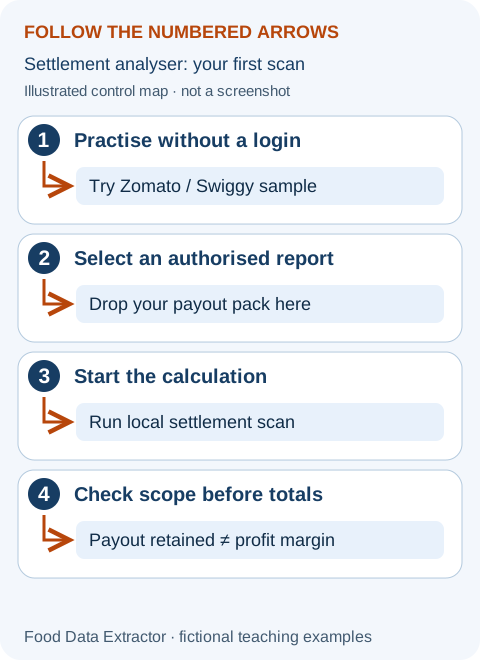
Free versus subscribed: free analysis includes one file, up to three cycles, core totals and alerts. Subscribed access adds batches, all cycles, the full table and reconciliation CSV download. The public samples do not bypass these access boundaries. To practise bank matching, use the invented two-platform demo. If a real file is rejected, follow troubleshooting; never send passwords, OTPs or unredacted bank statements to support.
Use it when: you want to test a basket price, recipe cost, funded discount or advertising allocation before making a live business change. No file, account or subscription is required. The tool recalculates typed values locally. Choose the platform, but replace its inputs yourself: the label does not fetch your agreement, auto-detect fees or guarantee a platform’s current rate.
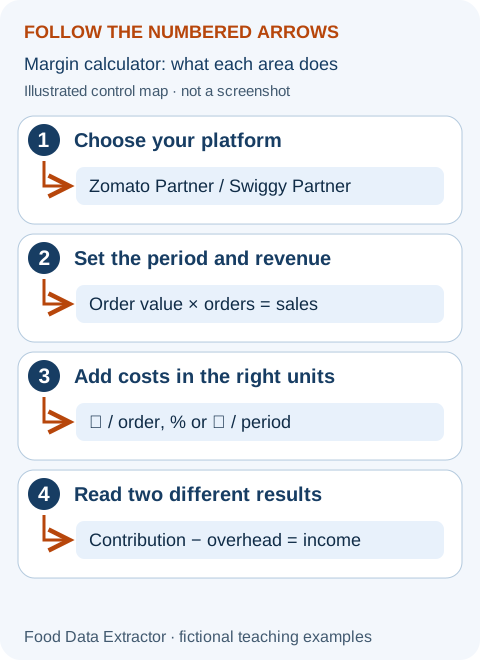
Open the margin calculator. For this fictional exercise, enter every value below, including zero fields, so existing defaults cannot affect the result. These are teaching assumptions, not Zomato or Swiggy prices or tax advice. Sales use a consistent restaurant-revenue basis before the separately entered funded discount.
| Field on the tool | Enter | Unit / meaning |
|---|---|---|
| Average order value | ₹500 | Revenue per included order |
| Orders in period | 100 | Completed orders in this scenario |
| Food cost per order | ₹160 | Weighted basket ingredient cost |
| Packaging per order | ₹25 | Container, bag and relevant packing |
| Commission rate | 20% | Percentage of entered sales, assumed here |
| Tax on commission | 18% | Applied to commission only; verify your invoice |
| Restaurant discount/order | ₹20 | Restaurant-funded share only |
| Fixed platform fee/order | ₹0 | No extra amount assumed in this example |
| Payment/other fee/order | ₹0 | No extra amount assumed in this example |
| Advertising cost/order | ₹15 | ₹1,500 period spend ÷ 100 orders |
| Refund/cancellation allowance | 2% | ₹1,000 assumed allowance on ₹50,000 sales |
| Effective cash withholding | 0.1% | ₹50 cash movement, not operating expense |
| Other deductions/order | ₹0 | No additional operating deduction assumed |
| Fixed overhead for period | ₹5,000 | Total overhead for these same 100 orders |
Click “Calculate income margin” to move to the results. With these inputs, sales are ₹50,000; commission ₹10,000; tax on commission ₹1,800; discounts ₹2,000; ads ₹1,500; and refund allowance ₹1,000. Food and packaging total ₹18,500. Contribution income is ₹15,200. After ₹5,000 period overhead, estimated operating income is ₹10,200, or 20.4% of entered sales.
Estimated cash payout before food costs is ₹33,650, including the assumed ₹50 withholding. It differs from both contribution and operating income. The model does not claim your actual bank transfer will equal it; real settlements can include additional tax movements, prior adjustments and different timing. “Operating break-even order price” is the modelled price needed at the entered order volume and cost pattern, not a prediction of customer demand.
For a new partner, start with the launch checklist. For a cash discrepancy, use reconciliation. For ingredient and fixed-cost decisions, use contribution margin and the weekly review. Unclear contracts and tax treatment require the relevant official records and qualified advice, not a more precise-looking calculator.